Manual add-on lines

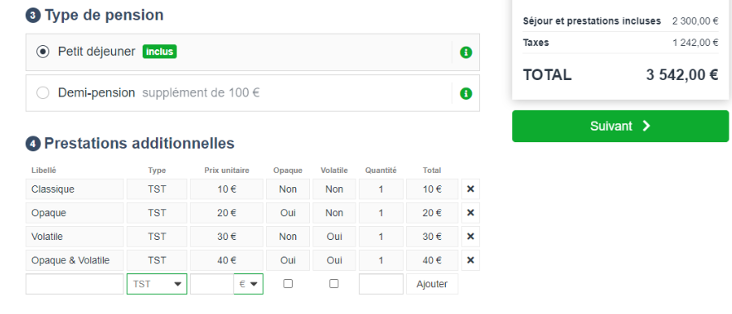
In a B2B booking process, it is now possible to add fare lines manually.

For each manual service added, the agent chooses :

  • A service label
  • A typology from the distributor’s categories
  • Opacity: An opaque service is one that will be added to the total price and will not be visible to the customer in the file details.
  • Volatility: A volatile service is one that is not sent to the distributor. It appears on the quotation page to be shown to the customer, but disappears when the travel agent actually books with the distributor, so it is not sent to the distributor.
  • A quantity
  • A price

“Marine” fares and Inclusive Tours

The “Marine” fare type has been added for airlines offering it.

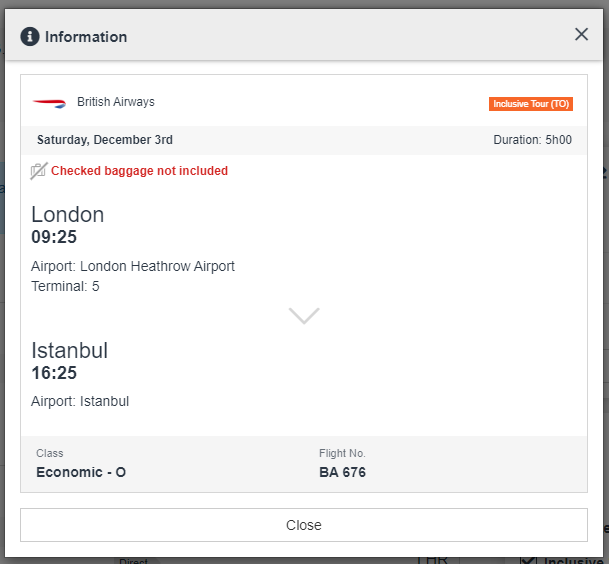
Similarly, for greater clarity, the “IT” fare type has been renamed “Inclusive Tour” (TO) in the flight information pop-in like the others fares already implemented : P (Public), N (Negociated), C (Corporate) :

Flight information pop-in

Removal of availability from Activities & Services products

The mechanism for deleting Activity availabilities has been revised so that importing a grid containing an empty service (with no price, quantity or date) deletes all availabilities.

However, if at least one of the elements is filled in, the import error detection mechanism is still activated. Only totally empty availabilities are deleted.

If you enter a date in the past, the availabilities will also be deleted.

Improved quote and summary printouts

The quotation summary, and in particular its printing, have been improved to produce a more qualitative document. For example, it is now possible to insert a header and footer on this document.

Commission management for secondary sources of Activities and Services

In the fare management module, the minimum granularity for selecting the partner to which the defined commission applies has been increased by one level, enabling to reach the secondary source and thus apply different commissions depending on the secondary source.