Distinction between Issue and Book actions when booking transport

Improved payment choices and wording to be consistent with booking and issuing conditions, and clear to agents.

The means of payment and the wording of the payment button is consistent

  • “Book” in the case of a reservation without automatic issue.
  • “Issue” in the case of a reservation with issue.

Use cases :

To book a flight without the need to issue: The CB payment method is not proposed (just “On account”) and a “Book” button is displayed.

Book a flight that needs to be issued: A CB payment method and “On account” are proposed. The latter is of course only proposed if capping is activated and authorized and with a sufficient balance.


Manual geolocation entry for internal products

The geolocation of internal products can now be entered manually in the Administration module.

Two fields Latitude and Longitude are added to the technical information of a product

Gestour Producer System – Addition of “Cabin Classes”, “Direct Flight” and “Honeymoon” filters

New filters allow real-time queries to the Gestour system with filters on the cabin, on direct flights and on Voyage de Noce fares.

If there are no flights corresponding to the requested criteria, the real time answer will not contain any flight and will not be in error if the tour operator allows a sale without transportation, otherwise there will be an error announcing that transportation is mandatory.

The Honeymoon criterion will trigger specific rates if they exist, otherwise the “standard” rates will apply.

Clarification of the action when booking an airline ticket in direct connectivity

When booking a flight with direct connectivity, the ticket may be booked only, or with direct issue (and therefore a payment).

The wording at the time of booking has therefore been revised: Book on a simple reservation. Issue when booking with direct issue.

The coherent means of payment are then also proposed (CB payment, if applicable) and payment on account (if no limitation is activated or the balance is below the current limitation.

Payments in 3, 6 and 10x with Pledg

logo_pledg-450x226

Payments in 3, 6 and 10x are now available via the Pledg split and “multi-payment” system.

Synchronization of Agencies for Gestour Producer

A synchronization is now possible between the Orchestra platform and the Gestour Producer system to allow automatic updating of agencies.

The synchronized data are :

  • My profile data (Name, address, postal code, city, phone, fax, email, …)
  • The activation status of the agency
  • The credentials
Gestour_450x226

Centralized configuration of product exclusion for “On Request”

A producer can now request the filtering (and exclusion) of products that are booked “On Request” for his entire distribution.

Withdrawal of the balance via Limonetik

This evolution has added the possibility to deduct the balance of the total amount a certain number of days after the reservation when making a partial payment with Limonetik, instead of deducting a certain number of days before the departure.

Limiting the visibility of the Distributors criteria

The user rights popup now allows to limit the visibility of the “distribution” criteria in the Administration tool search engines.

The “distribution” criteria are displayed in the Administration tool’s search engines (packages, hotels, activities, stages, notices and editorials) according to the user’s existing rights.

  • With“MO-Visibility on all criteria” right
    • Allows to have the right to see all the criteria in all the search engines (overloads the “Criteria visibility” list, but does not overload the “Distribution column criteria restriction” field)
  • With right PRODUCTS-Limitedvisibility of criteria”
    • Allows you to limit the criteria to be displayed in all engines according to those selected in the Criteria visibility selection.

If both rights are assigned to the user at the same time, the first one (MO-Visibility on all criteria) has higher priority.

If neither of the 2 rights are assigned, no criteria will be displayed on the search engine. This behavior is :

  • Identical to the package criterion popup, as it is not even accessible in this case.
  • Different from other criterion popups that are not based on the right PRODUCTS-Limited visibility of criteria for the criterion action.

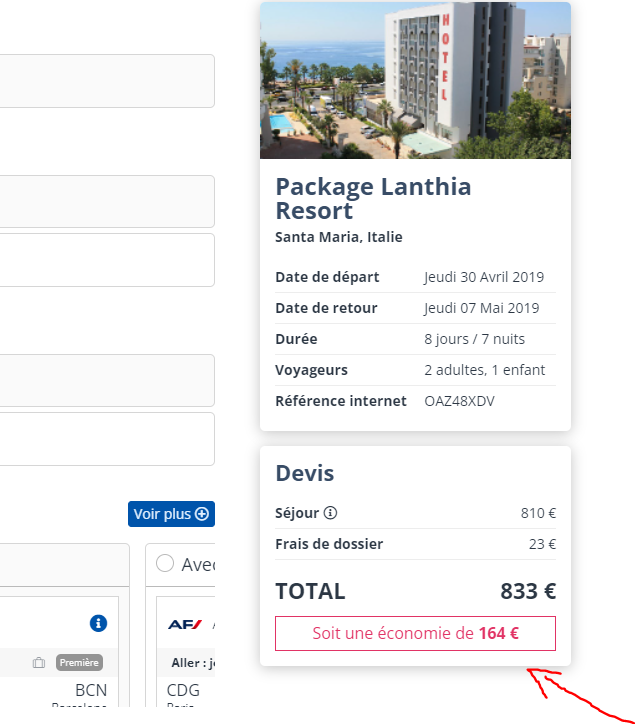
Highlighting of discounted prices and discounts applied in the booking process

It is now possible to display the difference between the brochure price (crossed out price) in the catalog and the sales price in the reservation process.
This information about the amount saved is for information purposes and is displayed when a number of conditions are met.

View of the booking process