Pre-packaging: Transfers based on flight arrival times/days
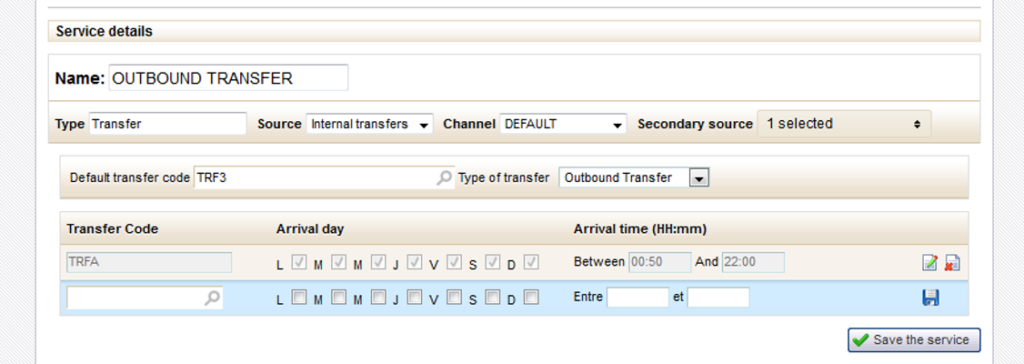
In a pre-package, internal transfer services can now be offered according to criteria about the corresponding flight. These criteria offer different transfers based on flight arrival times/days.
The following transfer criteria are suggested :
Default transfer code
Type of transfer
(outbound/return)
List of alternative transfers
based on flight arrival days/times
The transfer type associates the transfer to the “Outbound” flight or the “Return” flight. The list of alternative transfers specifies individual transfers to be suggested based on arrival days and times for the associated flight. Validation of the form ensures that the various alternative transfers defined do not overlap.
If the arrival days/times do not correspond to the constraints specified in the list of alternative transfers, the default transfer will be suggested.
New transfer criteria when defining a pre-package
Optimising distributor criteria
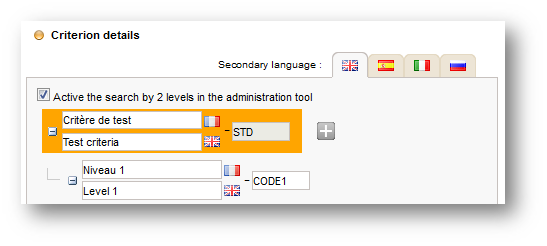
When defining a distributor criterion in the “Setup > Criteria” section of the administration tool, it is now possible to activate an option to submit this criterion in two select-boxes within the various search tabs of the administration tool.
New option “Activate 2-level search in the administration tool”
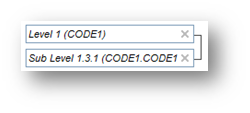
This option is especially useful for multi-level criteria with a high number of values. The first select-box contains the values for the first level and the second contains the sub-level values chosen in the first select-box.
2-level select-box in the product tab search engine in the administration tool
Furthermore, various criteria performance optimisations were made in the “Configuration > Criteria” section and in the pop-up for associating the criteria to packages/hotels/steps/editorials.
Evolution of the notes/history system
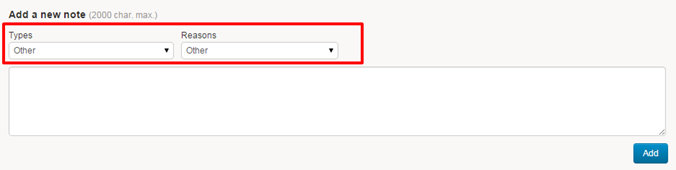
The user can now assign a type and a reason to a note. The values of these select-boxes are configurable.
New “Types” and “Reasons” fields during note creation.
A filter system has also been added to be able to filter by :
Method (automatic or manual
notes)
Type
Reason
New notes filters by “Type”, “Reason” and “Method”.
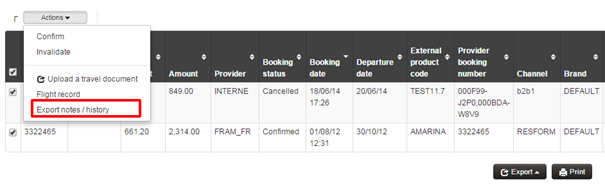
Moreover, it is now possible to export the complete history (CSV) of one or more folders from the action list. This export will contain one line per folder and per note, and will consist of the following columns :
File distributor reference
Supplier of the file
Date/time of the note
Login associated with the note
Note method (automatic/manual)
Note type
Reason for the note
New export action for file notes/history .
Evolution of Web Services
New methods are now available in Back Office Web Services :
getBookings(String[] mails, String profile)
This web service returns the complete files (client/pro invoices, tariff lines, payments, etc.) for customers whose email addresses are given as a parameter.
This web service returns the partial files corresponding to the search criteria given as a parameter (the result list is limited thanks to the “numberOfFiles” parameter).
In the same manner as “getBookingFilesPerAgency”, this web service returns partial files except in this case it is possible to input multiple statuses and the fields “beginIndex” and “endIndex” allow for management of result pagination.
completeBookingFile(String id)
This web service returns the complete files corresponding to the identifier given in the parameter.
Search performance optimisation
Back Office file searches were optimised, in particular for searches returning a large number of files.
A new universe : Connectivity validation
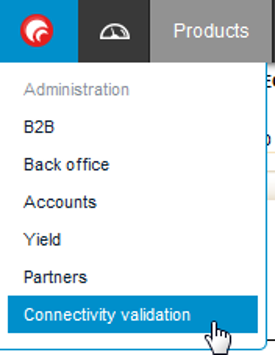
A new “universe” can now be activated in the main menu: “Connectivity validation”. This new module can be used by distributors and producers.
It validates the external connectivity of producers.
New “Connectivity validation” universe in the main menu
The goal is to verify the information displayed on the quote page (availability dates and prices of different items) by running automatic availability queries on the products selected. Once all availability requests have been executed, a report is sent to the email address indicated. The email contains an Excel report with all information necessary for validation :
Number of OK and NOK availabilities
Price differences with the catalogue
Response time
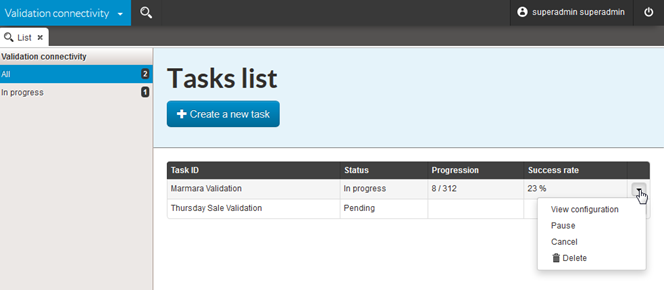
Several validation tasks can be programmed and executed in parallel (with a configurable limit). The home page shows a list of tasks and their status :
Hom page of the “Connectivity validation” universe
A left filter allows you to display current tasks only. Each task can be controlled through a menu containing a list of possible actions (edit, pause, cancel, delete).
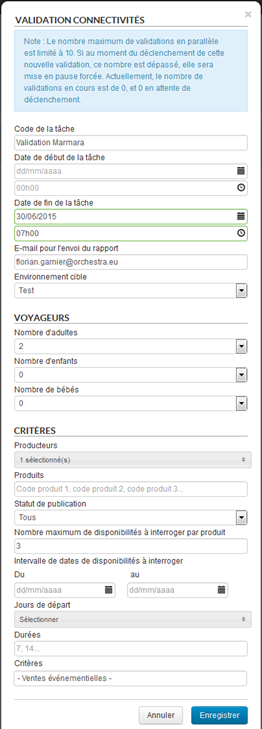
Clicking the button “Create a new task” will make a new form appear that allows you to define a validation program for a producer. Its launch can be programmed by entering a start date, and its execution can be stopped automatically by entering an end date (in case validation is not completed, to avoid too long or excessive load execution on the producer’s server).
Additionally, different criteria are used to limit the list of products and availability for inquiry.
Producer validation task creation form
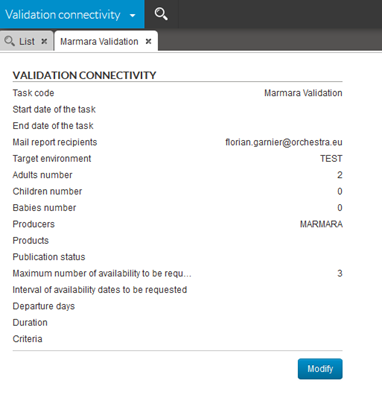
Once a task is created, its configuration can be accessed by double clicking on it in the list. A tab showing the configuration of the task in question opens. The possibilities for modifying the task vary according to its status :
If the task has not been started, all fields are editable
If the execution of the task has been started, the list of editable fields is restricted
If the task is complete, the configuration is no longer editable
View of a producer validation task
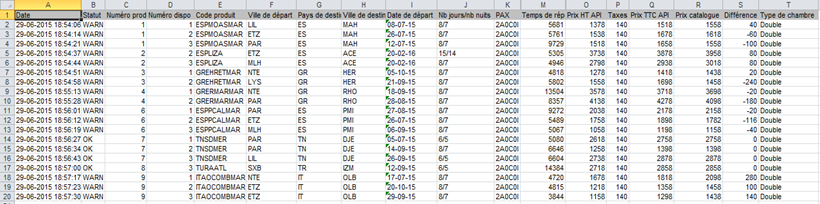
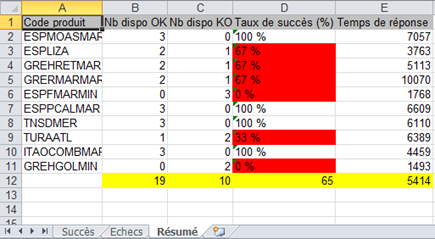
Once a task is completed (or cancelled), an Excel report is sent to the email address indicated. The Excel report contains three tabs :
A “Success” tab containing a list of all OK availabilities
Validation report “Sucess” tab in Excel format
A “Failures” tab containing a list of all NOK availabilities
Validation report “Failures” tab in Excel format
A “Summary” tab containing statistics for each product queried.
Validation report “Summary” tab in Excel format
6.2. Reports for NOK quotes/reservations and depleted stocks
A new tool was developed for sending reports concerning :
Failed
quote and reservation transactions
Depleted
stock for internal products (shared stocks).
These reports can be sent periodically by email as an Excel file.
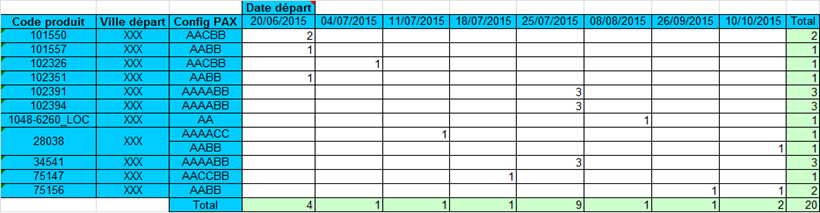
NOK quote/reservation reports contain the number of failed transactions in the form of pivot tables whose horizontal axis and vertical axis can be configured.
For example, a report can be defined with the product, the departure city and the passenger configuration for the horizontal axis and the starting date for the vertical axis. The email body contains a summary by product (or producer) statistics.
Example of NOK quote Excel report
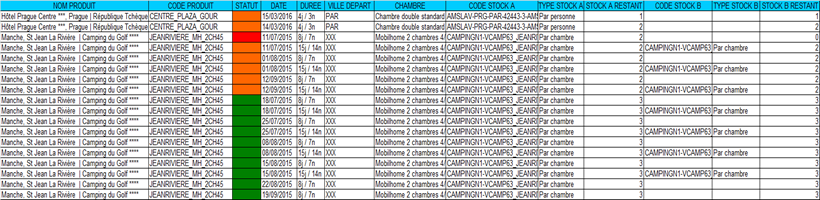
The reports on depleted stocks (shared stocks) is only for internal products and appears as an Excel file with two tabs. The first tab contains a table with a list of all remaining stocks and their availability for requested products and the second tab contains the list of availability whose stocks are depleted or below
2. The email also contains a summary of this information by product (or producer).
Example of depleted stock Excel report
For example, these reports can be used to monitor the performance of a sale or a special operation throughout its development. Performance reports on failed quotes/reservations and monitoring of stock depletion allow for restocking of successful products or detecting products that sell poorly.
Management of depleted status for connectivity packages
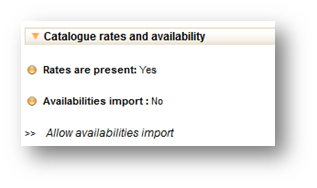
Connectivity packages can now be marked as depleted if the producer sends back an unavailability code when querying the date in real time. This function is configurable and the default behaviour is to remove the date when it is no longer available.
Moreover, to maintain the depleted status in the calendar, this mechanism must be linked with import management at the product level. With the “Allocate rates” action in the administration tool, it is possible to disable the import of a product’s availability so that the depleted dates are not overwritten by the next update.
Allow/prohibit availability import action for a connectivity package
New source hotels : Europlayas
The Europlayas hotel reservation centre is currently being certified.