Management of permissions based on transverse content categories
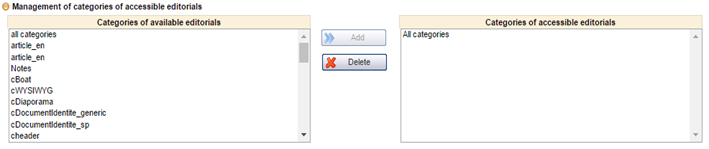
It is now possible to restrict permissions for writing transverse content based on its category.
By default, the user has permissions for all transverse content categories. This new section is available from the user profile.
Management of permissions on transverse content categories
Improvement to management of internal hotels
Management of age ranges by hotel
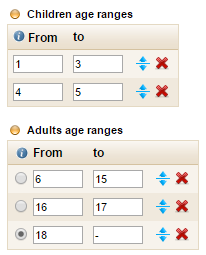
It is now possible to define new age ranges within the adult and child groups using the hotel configuration form. The occupancy section of the room creation module is updated dynamically with the new age ranges.
Entry form for new age ranges
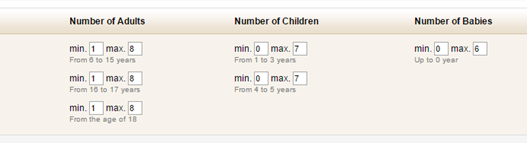
Following the creation of room occupancies for different age ranges, for example :
Double room 1 adult + 1 child
(between 8 and 12)
Double room 1 adult + 1 child
(between 2 and 8)
Different prices can then be defined for the different room occupancies in the hotel planning module.
Example of occupancies with new age ranges
Configuration of mandatory commission in the schedule
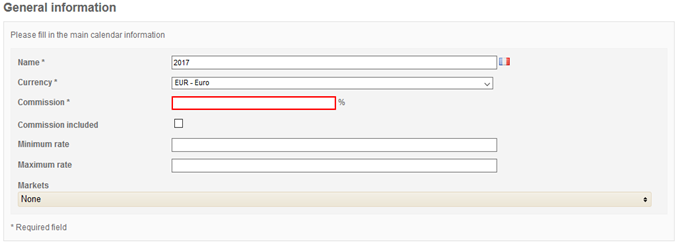
The commission may be made mandatory in the internal hotel planning. This configuration is applied via the general configuration of the administration tool.
Mandatory entry of the commission
Application of yield rules on taxes
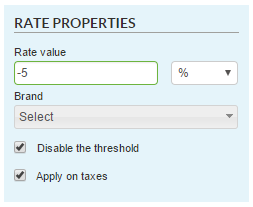
On the different sales processes, yield rules can be applied to taxes. The configuration is available in the properties section when creating the yield rule.
“Apply on taxes” checkbox
Configuration of the order of display for the “Phone” fields
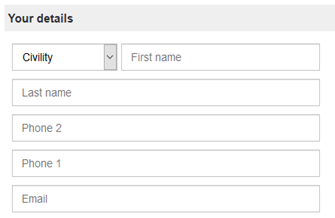
The order in which the fields are displayed in the contact details page can now be reversed.
Reversal of the “Phone” fields in the booking tunnel
Configuration of the display of traveller details on the payment page
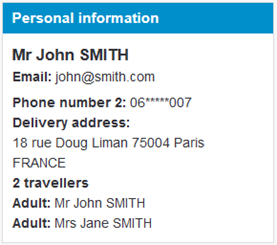
It is now possible to choose whether or not to display the traveller details in the “Personal information” box of the payment page in the booking tunnel.
Display of passenger information
Configuration of the printing of the quote
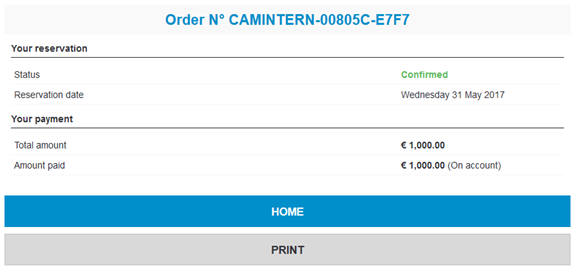
The summary of the order can currently be printed from the payment page.
Print button available below the payment summary
Display of the types of promotion
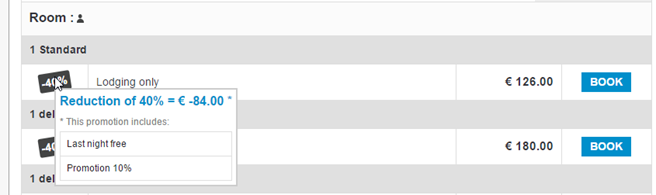
The list of promotion titles included in the room price, and the total amount (of the sum) of the promotions are available in the booking tunnel.
The display of this detail can be activated for each booking process channel.
Details of the promotions applied to this room
Improvements to the manual file creation
Below is a list of the improvements made :
Selecting a start date
automatically opens the calendar for the selection of an end date,
Automatic calculation of the
number of days and nights based on the start and end dates,
Pre-selection if the
scroll-down list contains only one value in the forms,
Pre-completion of the agent
information defined based on the information of the user connected to the
customer/traveller creation form,
Simplification of the flight
creation form.
Quote management
Multi-currency entry of price lines
The net prices can now be entered in the supplier’s currency by specifying the associated currency on each price line.
Price line in British Pounds Sterling
Calculation of selling price based on net price, commission and markup
It is now possible to enter the net price, the commission as a percentage and the markup as a percentage to obtain the selling price, whereas previously the commission was deduced from the gross price – net price formula.
Entry can be in the following order :
Entry of the net price,
Entry of the percentage (or
value) of the commission leading to the calculation of the gross price,
Entry of the markup affecting
the sale price.
Awaiting the commission to calculate the gross price
The gross price calculated based on the commission as a %
The final selling price calculated based on the gross price and the markup as a %
This new input method can be configured from the back-office module.
Miscellaneous improvements
Creation of a price line
without validation, title ‘’Error – Free entry’’ in the Quote section of a
file,
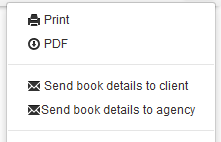
Creation of buttons to send a
quote in PDF format without displaying commission to customers, and displaying commission
for agencies.
Access to this feature is to be defined in the user permissions.
New insurance source
Integration of the Allianz Global Assistance solution
The new external insurance API, Allianz Global assistance, is now available during the booking process.
A new connector has therefore been developed to retrieve insurance products from the supplier and book them.
Changes to flight sources
Integration of Misterfly auto-completion
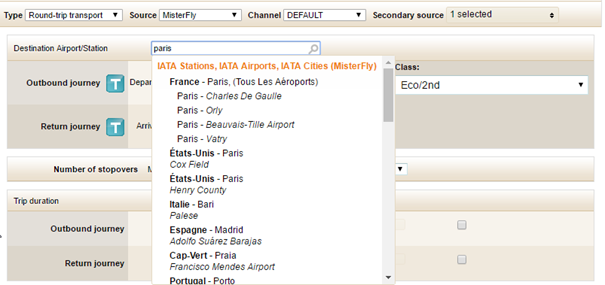
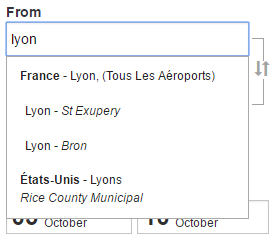
Misterfly auto-completion is now available in the administration tool, the B2B solution, the booking process and in the B2C catalogue via a specific integration.
Auto-completion integrated into the pre-package creation form
Auto-completion integrated into the booking tunnel and the B2B solution
Changes to providers
Improvements have been made to the Promovacances and Megavacances providers, to provide a more appropriate catalogue.