Adding a search engine to the agency commission tab
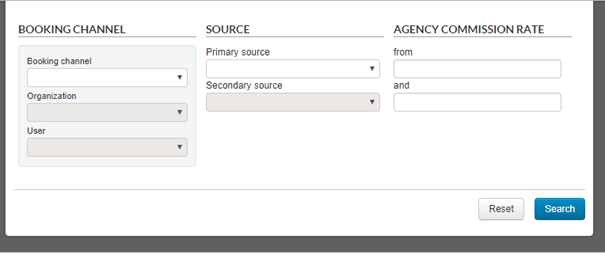
A search engine is now available on the agency commission tab.
Search engine on the Agency commission list tab
You can search using the following fields:
Booking channel,
Organisation,
User,
Primary and secondary source,
Commission rate.
Adding user labels to the reservation channel lists
User labels are now also displayed in brackets on the reservation channel lists within the agency commission tab.
Changing a user’s label is better than changing an identifier’s label, as it has no impact on applying agency commissions to your products.
New user rights on commissions and agency commissions
New user rights have been created as part of managing commissions and agency commissions.
Here are the new rights linked to profiles :
Commission Management: users
can view all commissions;
Commission Management Entries:
users have write-access to all commissions;
Agency Commission Management:
users can view all agency commissions;
Agency Commission Management
Entries: users have write-access to all agency commissions.
Displaying air miles in flight boxes
Miles associated with each flight are shown to encourage travellers to choose flights that benefit them, rather than simply the cheapest flights. Travellers may choose more expensive flights, but they’ll also earn more miles. This approach with both pricing and miles helps you to increase your revenue from selling flights.
With a direct connection to the ‘30K’ solution, it’s now possible to display the number of miles that can be earned from each flight within the airline’s ‘default or basic’ booking process.
Over 65 reward programmes covering more than 150 airlines across the world are now available with this connection :
Flying blue,
Miles & More,
Executive Club,
…
This addition is available in pre-package, flight and dynamic package sales processes.
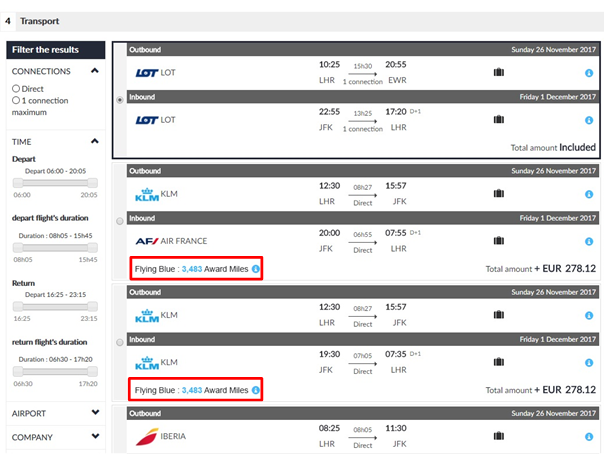
Search engine results within the pre-package booking process
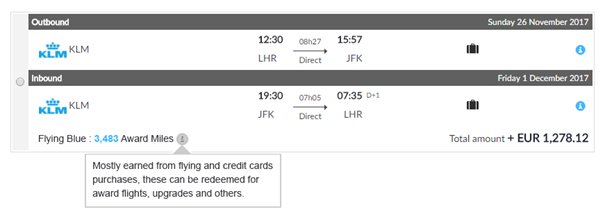
In the box showing outbound/return flights, the reward programme name, as well as the amount and type of miles to be earned are now displayed at the same level as the total price for all outbound/return flights involved.
Zoom in on the flight box for more details
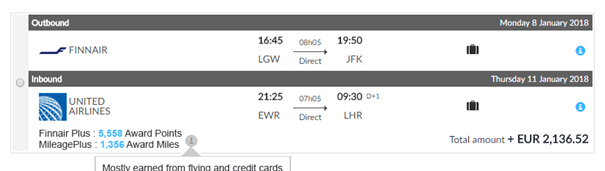
Where you have multi-airline flights, the list of different miles programmes will be shown.
Zoom in on the multi-airline flight box
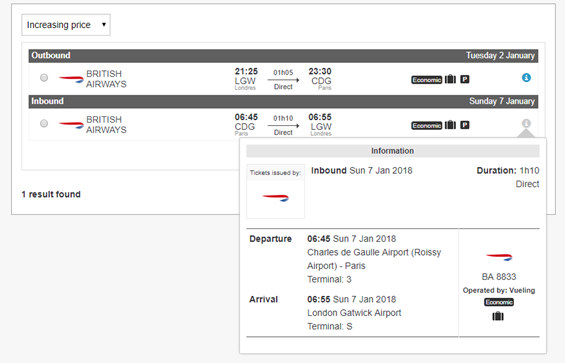
Displaying the airline selling the flight
The logo and flight number of the airline selling the flight will now be displayed. Furthermore, a ‘flight operated by’ description showing the operating airline is indicated within the flight information box.
Flights sold by British Airways and operated by Vueling
This change is intended to clarify any confusion over flights operated and sold by different companies.
Adding the promotions list to the email sent to hotels
The promotions list is now sent to hotel companies as part of the confirmation email for hotel products within the Orchestra platform.
Changes to Casino payments
Some changes have been made to Casino payments :
Showing ‘maiden name’, ‘place
of birth’ and ‘date of birth’ fields on the personal details page.
Sending the file reference to
Casino Banque so that data can be processed between back office agents and the
Casino Banque team.
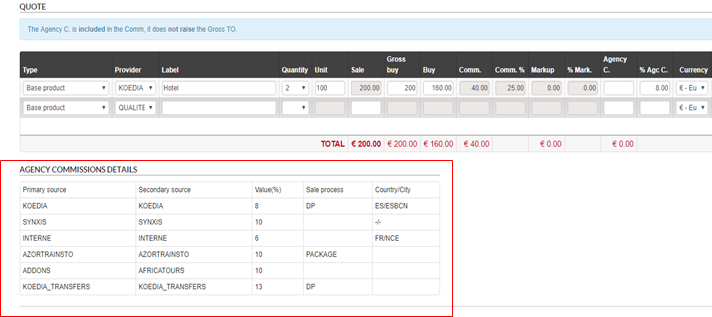
Displaying agency commissions in the quote section
A summary table of agency commissions is now available on the quote page for files created manually. Only applicable agency commissions within the file’s booking channel will be shown.
Form to create a quote with all agency commissions
Information on agency commissions helps agents understand all the commissions that should be applied manually to each part of the trip.
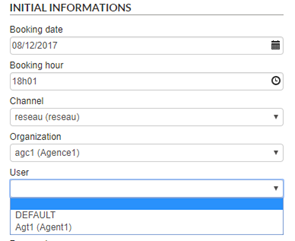
Adding user labels to the reservation channel lists
User labels are now also displayed in brackets on the reservation channel lists when a file is created.
Form to create a file
Vacation club quality guarantee
The best quality guarantee vacation clubs have been labelled. You will now be able to find them in your administration tool from version 14.7 onwards and as and when they’re labelled.
The ‘quality guarantee vacation clubs’ criteria can be found within ‘Product type’ in the ‘products/features’ column. It can be used with all sales interfaces at your discretion.
Activity provider Ceetiz is now available on the Orchestra platform from version 15.0 onwards.
Improvements to the availability cache system: Amadeus
A flight cache file can be set up to increase the number of available flights updated to pre-packages. This file will be imported 3 times a day.
This improvement makes it possible to refresh availability more regularly and, as a result, reduce rate differences in your pre-packages when compared to the flights shown on your quotes as ‘prices starting from’.
Improvements to the availability cache system: Koedia/H-résa
A cache file can now be set up to increase the amount of Koedia/H-résa hotel availability. This file will also be imported 3 times a day.
This improvement makes it possible to refresh availability more regularly and, as a result, reduce rate differences in your pre-packages when compared to integrated hotels.
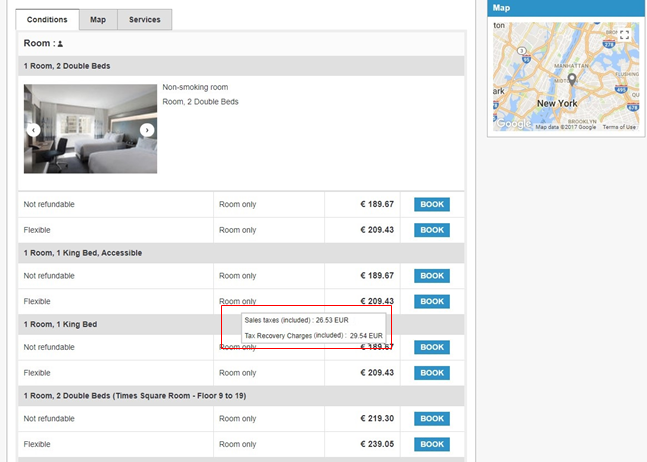
Displaying taxes : Expedia
Tax information included within prices is now available when making an Expedia hotel booking.
Displaying B2B hotel prices with taxes included
Managing discounts : Jet tours
Discounted prices on Jet tours products are now available.