Rights management for Transport sources

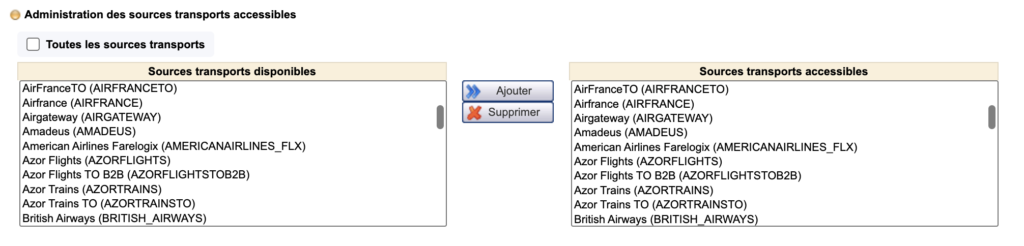
Transport” section of the user rights administration interface

The administration of transport sources accessible to a user is now done via the administration interface of the rights of the user in question via the section “Administration of accessible transport sources”

Checking the box “All transport sources” gives access to all present and future sources without exceptions.

Acceptance of reservation in case of KO

The objective of this evolution is to improve the conversion rate again and to satisfy customers in case of technical KO at the reservation. It will then be necessary to finalize the reservation in a second time.

It consists in displaying a confirmation page at the moment where today an error page is displayed and notifying the distributor of the file to be managed in order to keep the sale.

This makes it easier for the customer to understand the KO cases that can be finalized through the intervention of a travel agent in the back-office.

It is now possible to configure the desired mode: error page or confirmation page.

In practice, there are two types of KOs:

  • On a KO booking: you can have the error or confirmation mode
  • On a payment KO:
    • Recoverable: we activate the mode that creates the “estimate” in the BO but we do not redirect to the error page or confirmation (because we find the payment page again)
    • Fatal: you can have the error mode (even if the confirmation mode is technically possible but not recommended)

On the confirmation page and the confirmation email associated with KOs, there is the possibility to display a specific information message to distinguish this case from a standard confirmation page

Hotel call-to-action in the reservation process

In the results list of the Hotel process, the entire hotel cartridge is now click sensitive to select the hotel and move to the next step

This seemingly minor change significantly improves the user experience.

Management of dynamic cancellation conditions via SynXis

Via the SynXis channel manager, it is now possible to display the cancellation conditions according to the selected rooms and boards.

B2B graphics improvement

Various improvements have been made to enhance the look and feel of the B2B Products and Booking tool, including

  • Adding a default logo when the tour operator logo is missing (in the comparator, engine return, product sheet and quick search).
  • Increased margins between columns in search forms.
  • In selectboxes with criteria, removal of the 1st level bold.
  • For all calendars, the calendar icon has been moved to the left and slightly larger for datePickers and the logic of blocking a return date that is less than the outgoing date. For datePickers other than PACKAGE, fill in the return date with departure date + 7 days.
  • For the fields allowing the entry of a child’s date of birth :
    • Move from one box to another using the directional arrows
    • You can only fill in numbers
    • You can only fill in the correct number of characters
    • A value greater than 31 for days or 12 for months will be automatically replaced by the maximum value

Floa payment in 3 and 4x via the PSP Limonetik

Payments in 3 and 4 times are now available via the PSP Limonetik / Thunes.

Connectivity of B2B autocompletion with airline profile

The airline profile is a sum of information about an airline in direct connectivity, which includes the list of routes available via this airline.

An autocompletion of a destination on a single-airline source should therefore only be completed automatically on the basis of the origins and destinations available on this airline, as well as when querying a switch aggregating several airlines in direct connectivity.

Default sorting in the lists of favorite and viewed products

Viewed and favorite products are now displayed in a predetermined order in B2B. Products, whether available or not, are displayed in chronological order, from the most recent to the oldest:

  • Last seen products are sorted by their date of last consultation (most recent first)
  • Favourite products: Sorted by the date they were bookmarked (most recent first)