Hotel layout improvement

To improve the user experience and increase the readability of the information, the hotel cartouche in the search result page of the hotel booking process has been revised.
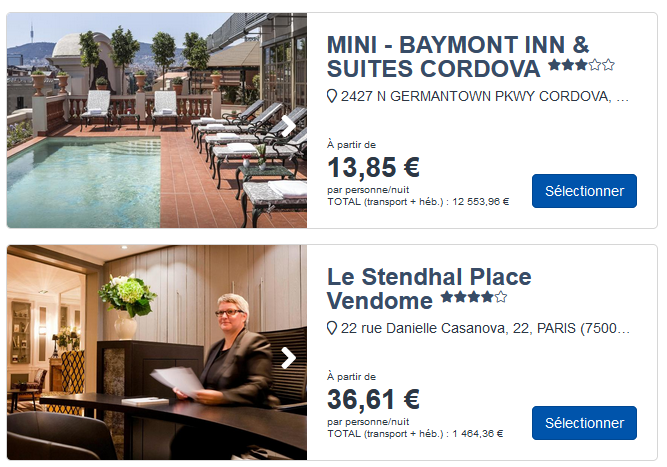
The following changes have been made:

  • The address does not span 2 lines regardless of its length.
  • There is no more summary, the photos take precedence.
  • The keywords are below the address.
  • The price has been moved.
  • The positioning of the Call-to-Action button is now :
    • Desktop: bottom right
    • Mobile: takes the whole width of the cartridge
  • The image slideshow now has one of the following behaviors:
    • If the slideshow has a number of images greater than or equal to the number defined in configuration, there will be a total of this number of images in the slideshow, and the last image will have the blur effect and the invitation to go to full screen “see more”.
    • If the slideshow has strictly less images than the number defined in the configuration then all images are displayed, and there will be one more image corresponding to the last image but with the blur effect and the “see more” invitation to go to full screen.
Management of the ticket price guarantee deadline

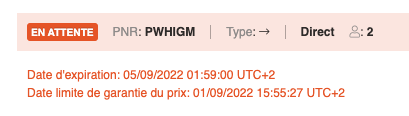
For transport sources that do not guarantee the price until the TTL (Time-to-live), the price guarantee deadline (PGTL) is recorded in the backoffice and displayed in the Transport tab

The PGTL is received at the time of the book, either from the source response or using the current date at the time of the book if the price is not guaranteed according to each source type.

Display of TTL and PGTL in the back-office

If the PGTL is exceeded, the getBooking transaction triggers a “reprice” to update the price in the file before the issue when the “Issue tickets” button is clicked.

This function does not require any special configuration. If a source doesn’t return a PGTL, it means that the price is guaranteed until the TTL.

Modification of files by airlines

In the context of production-distribution via Direct Connect companies in pre-pack or dry flight. The management of the files varies according to the modifications, some require actions and others are modifications for information.

Functional description

The aim is to make the processing of messages sent by airlines clearer.

First, we must distinguish between changes that inform and are without consequence (Example: Addition of phone or identity information) of changes that can impact the file (Example: change of flight)

Then on the modifications that impact the file, we must distinguish two sub-sets:

  • The quick modifications to be processed. For example, the outbound flight is shifted by one hour and does not impact the rest of the file
  • Changes that require a longer processing time. For example, the flight is shifted by one day. In this case, the rest of the trip must be reviewed with the customer.

Case of use

Case 1:
A modification arrives, there is no action, the modification must go in the list: “Information”.

Case 2:
A modification arrives, there is an action to carry out, the modification must go in the list: “Fast treatment”.

Case 3:
A modification in the list “Fast treatment” is validated, it disappears from the list.

Case 4:
A modification in the “Quick treatment” list cannot be validated. It must be possible to put a “LowPriority” label. The file must be sent to the “Long processing” list.

Tracing of critical actions

A list of critical actions are now traced in order to be able to find the time stamp of the action, the account of the user connected and the content of the action.

Here is the list:

  • Product :
    • Modification (configuration management)
    • Add to the recycle garbage can
    • Delete from the recycle garbage can (restoration)
    • Add to blacklist
    • Publish, unpublish, schedule de/publish
    • Link with :
      • Criteria
      • Hotel
      • Pushing
  • Activity:
    • Add to recycle garbage can
    • Delete from trash (restore)
    • Add to blacklist
    • Publish, unpublish, schedule de/publish
    • Link with:
      • Criteria
      • Flight
      • Hotel
      • Product
  • Hotel :
    • Modification (configuration management)
    • Add to the recycle garbage can
    • Delete from trash (restore)
    • Publish/unpublish
    • Link with:
      • Criteria
      • Highlighting
  • Criteria (parent) :
    • Modification (of the label as the code is immutable)
    • Deletion (leads to a deletion of the children below)
  • Criteria (child) :
    • Modification (of a label, of the code)
    • Deletion
  • Filter :
    • Creation
    • Execution
    • Modification
    • Delete
  • Transverse contents :
    • Publication
    • Criteria
    • Editorial modification
    • Modification of the configuration
    • Deletion
  • Product:
    • Modification (configuration management)
    • Add to recycle garbage can
    • Delete from recycle garbage can (restore)
    • Add to blacklist
    • Publish, unpublish, schedule de/publish
    • Link with :
      • Criteria
      • Hotel
      • Pushing
  • Activity:
    • Add to recycle garbage can
    • Delete from trash (restore)
    • Add to blacklist
    • Publish, unpublish, schedule de/publish
    • Link with :
      • Criteria
      • Flight
      • Hotel
      • Product
  • Hotel:
    • Modification (configuration management)
    • Add to recycle garbage can
    • Delete from trash (restore)
    • Publish/unpublish
    • Link with:
      • Criteria
      • Highlighting
  • Criteria (parent):
    • Modification (of the label as the code is immutable)
    • Deletion (leads to a deletion of the children below)
  • Criteria (child):
    • Modification (of a label, of the code)
    • Deletion
  • Filter:
    • Creation
    • Execution
    • Modification
    • Delete
  • Cross-Cutting Content:
    • Publication
    • Criteria
    • Editorial modification
    • Modification of the configuration
    • Deletion

Payment rights in the Backoffice

It is now possible to disable payment capabilities in the backoffice in order to separate “air fulfillment” payment actions from payment actions on files in general.

Improved Assurever connectivity

The connectivity with Assurever (ex-April) has been improved so that the identifiers of the reserving agency and the context of the reservation can be sent to Assurever.

Highlighting of available payment methods

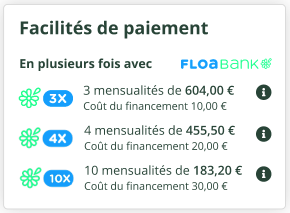
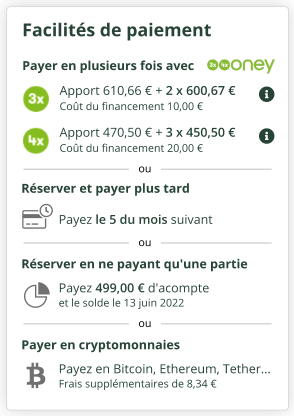
Depending on the payment methods used by the distributor, it is possible to display the payment options on the quote page.

Here are some visual examples:

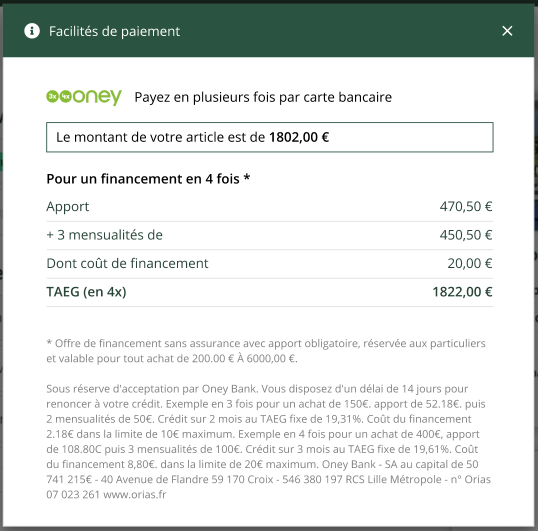
When clicking on the “i” button, a modal window is displayed giving the details of the payment method including the payment schedule, for example for Oney: