You now have the possibility to place widgets adapted to the different sales processes on the home page.
In the same way as with packages, you can push a hotel search, flight search, dynamic packages search, particular hotel, etc.
One click on the new widgets opens up the search results in the corresponding tab.
New icons
The icons in the menu bar have been redesigned. Icons indicating the name of a tool (B2B, Back Office, Yield, etc.) and the page loading status bar can now be given longer titles in multiple languages.
The icon for the packages search list has been replaced with a new magnifying glass icon which allows you to select the search engine you want in a drop-down list. This list of search engines can be configured by channel, agency or agent. For example, you can configure “package sales only” for particular agencies, and configure “package sales + hotel sales” for other agencies.
New icons and new search tabs
Search engines dedicated to each process
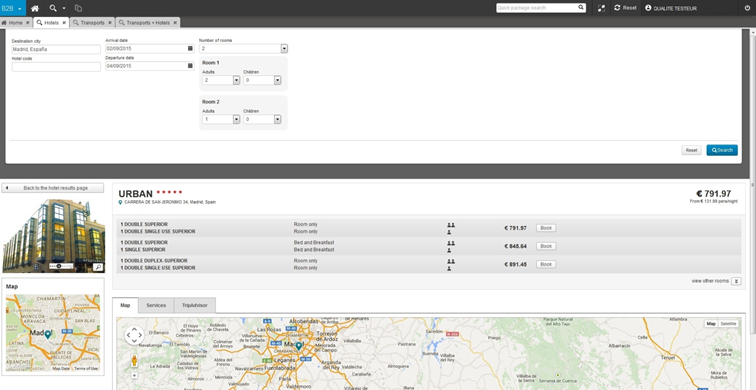
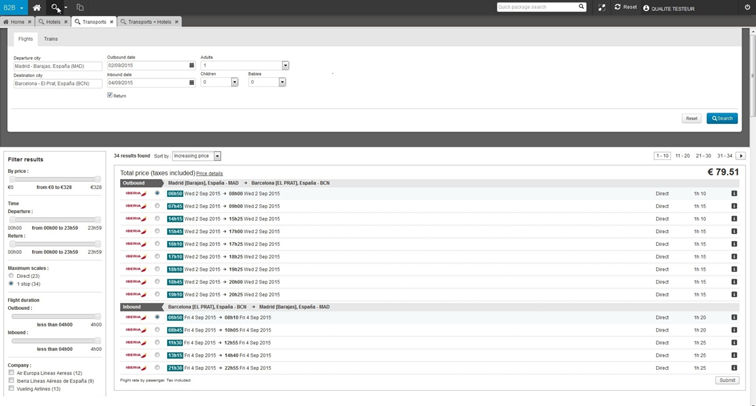
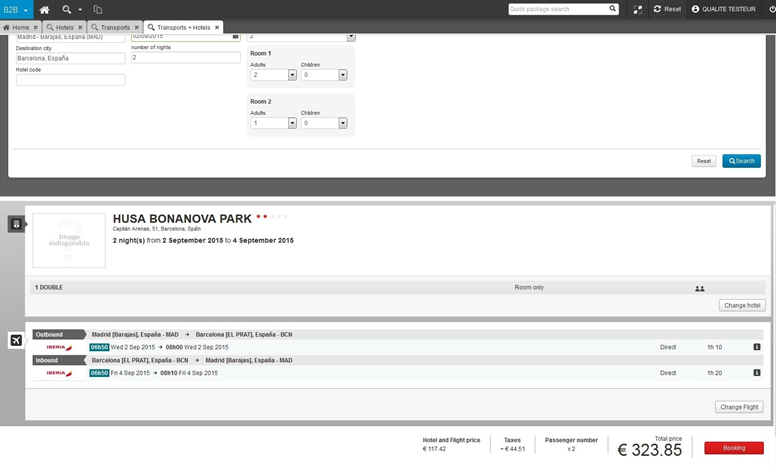
The search engines for hotels, transport and dynamic packages now open in a dedicated tab, in the same way as the packages search tab. These tabs comprise a search engine at the top of the page and the search results below (all in the same tab).
However, unlike the packages search (and pre-packages search) which uses a cache system, the search engines for hotel processes, transport and dynamic packages process information in real time. A specific “wait” message has been added, to give the user an idea of the real search duration.
Lastly, the way search results are displayed has been adapted to optimise their appearance in the B2B solution.
Hotel search tab
Displaying a hotel in the hotel search tab
Transport search tab
Dynamic packages search tab
Commission on internal insurance
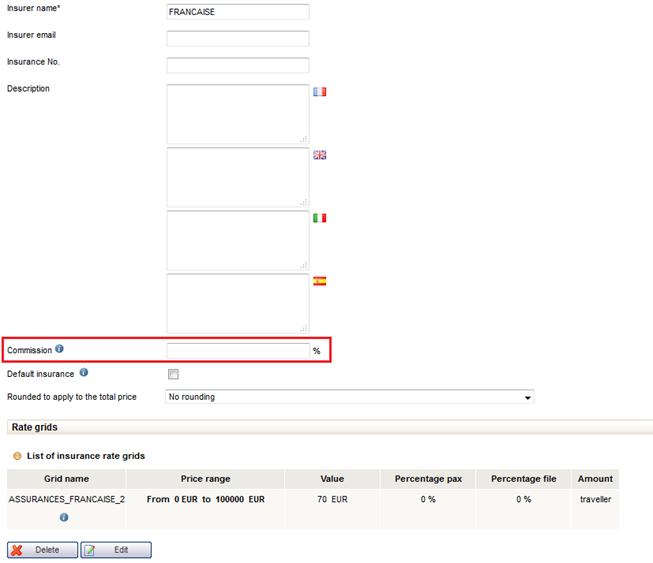
The administration tool now allows you to enter a commission value (as a percentage) for each type of internal insurance. This commission value will be taken into account during the booking process and is visible in the customer file generated in the Back Office (next to the pricing line for insurance).
If a general rate of commission for insurance has been set, but a specific rate of commission is set for a particular insurance, the specific rate of commission is the one that will be applied.
Entering a commission rate for internal insurance
Disabling degressive payments
When there is an automatic payment by debit card and a payment limit error occurs, it is now possible to disable the automatic payment attempts for a lesser amount.
Sending an email to a customer after a payment failure
When there is an automatic payment by debit card and a card error occurs (or the payment limit is reached) you can now send an email to the customer.
The email you send is saved in Back Office in the section, Payments > History, and can be downloaded in PDF format.
Link to download the email sent to customer after a payment failure
Displaying passport information
Passport information entered in the contact details page during the booking process is now displayed in the Back Office, in the “Customers/Travellers” section. This information is also included in the producer email.
Passport information displayed in the “Customers/Travellers” section
Reimbursement limit for bank transfers and debit cards
Reimbursements made through the Back Office are now limited by a certain amount, by default :
For reimbursements by debit
card: the maximum amount is the amount of the booking in question, or the
amount that has already been paid (if it is smaller).
For reimbursements by bank
transfer: the maximum amount is the amount that has already been paid.
It is possible for certain users to configure special rights to go above this limit.
Bank transfer reimbursement pop-in
Automatic producer reminder for an incomplete travel document
This new function allows you to send a reminder email to the producer associated with a file when it is missing travel documents and the departure date is drawing near.
You can configure the date for when the reminder should be sent.
Sort by file changes date
It is now possible to sort file search results by their “age”, in other words, the length of time since the time/date that the file change was made and the search time/date.
Sorting takes into account all the types of file changes (customer change, supplier regulation, distributor quote adjustment, total cancellation). If several changes have been made to a file, sorting will be based on the most recent change.
Changes in the new booking process
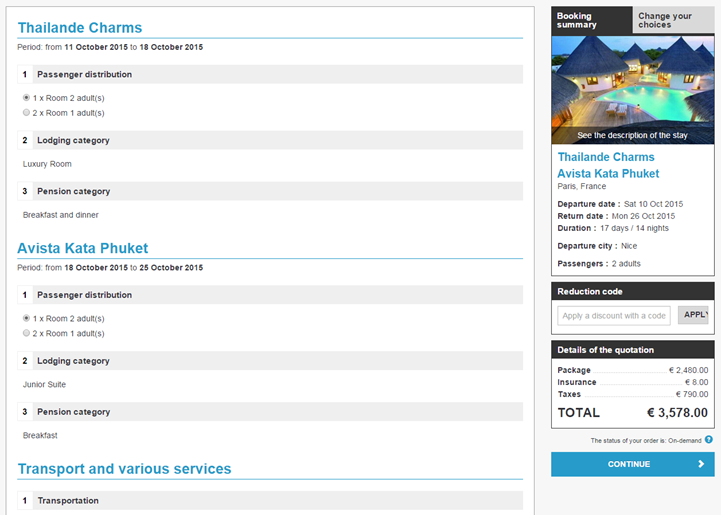
1/ Optimised multi-accommodation type product display
Multi-accommodation type products are now displayed so that the choices are clearly distinguishable for different segments of a trip. The name of accommodation has been added and numbering has been adapted to properly distinguish different elements of the trip.
Multi-accommodation type product display
2/ Management of “tracking” emails in merged contact details/payments mode
As a reminder, a “tracking” email allows you to identify users that have decided not to finalise a transaction after filling in the contact details page.
If the contact details and payments pages are separate this email will be sent after validation of the contact details form. If these two pages are merged the “tracking” email will also be sent now.
This email is sent 5 seconds after the internet user has finished entering their contact details and traveller information.
Send an email to service providers
An email can also be sent to service providers now so that they are immediately informed of the sale of their service.
Example of an email sent to service providers
New producers
The Kepler range is now available on the Orchestra platform.
Optimisation of the Jet Tours offer
The Jet Tours range has been optimised in different ways.
Some products have been given
additional durations (4 nights for example)
The Honeymoon product range is
now bigger
During the booking of a holiday
with a flight an information message is now shown systematically which allows
distributors to inform the customer that detailed information will be sent
later
Optimisation of credentials alert emails
Automatic credentials alert emails have been improved so that they can now include specific messages from the different producers.
This email lets you to know that an agency does not have their credentials configured, or have an inactive or invalid account.
It is now possible to change this information in the administration tool, or contact the producer to ask for new information for the agency in question.