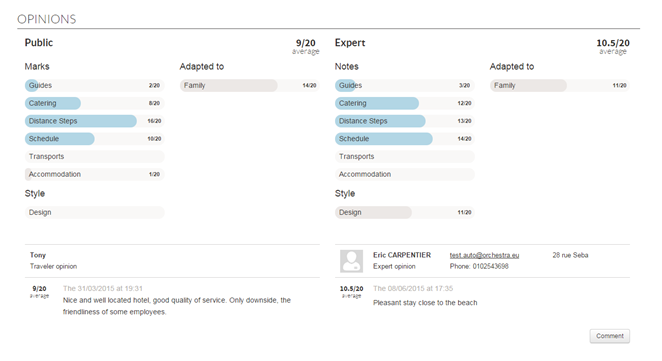
The “Opinions” section of the “package” product data sheet now differentiates more explicitly between “general public” opinions (holidaymakers’ opinions) from “expert” opinions (agents’ opinions). The section is divided into two columns :
The first column displays
general public opinions,
The second column displays
expert opinions.
Each of these columns is preceded by the list of corresponding subaverages as well as the overall average of each type of opinion (expert and general public).
The average featured at the top of the product data sheet always corresponds with the overall average, all types of opinion combined.
In terms of package engine feedback, it is now possible to sort by :
Number of expert opinions,
Number of general public
opinions,
Expert average,
General public average.
It is however possible to sort by total number of opinions and overall all types of opinion combined average,
Differentiation between general public and expert opinions
Rounding off opinion averages
A configuration now makes it possible to display averages rounded to the nearest tenth rather than to the nearest whole number.
Format of credences
The format of credences is now displayed in the corresponding form, below every field.
Viewing the format of credences in the B2B solution
Overhaul of the opening/closing charts
The management of opening/closing charts has been completely revamped to improve user-friendliness and performance.
The format of the chart template remains very similar to the old one. Apart from the “Availability status” column which was moved closer to “Type of action” for enhanced coherence, the other columns remain identical.
Example of opening/closing chart
One of the new features of the chart is that it is no longer necessary to generate a Zip file from the Excel file. The Excel file must be uploaded as is into the interface of the administration tool
Uploading the chart in .xls format
In addition, the validation of the chart has been revised. A clear table listing the potential errors for every line of the chart is now displayed. This validation is not critical; it is still possible to continue uploading the chart and the lines with error messages will be ignored.
New chart validation table
Once validated, the chart is uploaded asynchronously and an email is sent to confirm that the chart applies to all products concerned.
Email sent after uploading a chart
Mass management of producer configurations
A new section for the mass management of credences, partner codes and the producers’ travel policy is now available in the Configuration tab > Users > Producer configuration.
New “Producer configuration” sub-menu
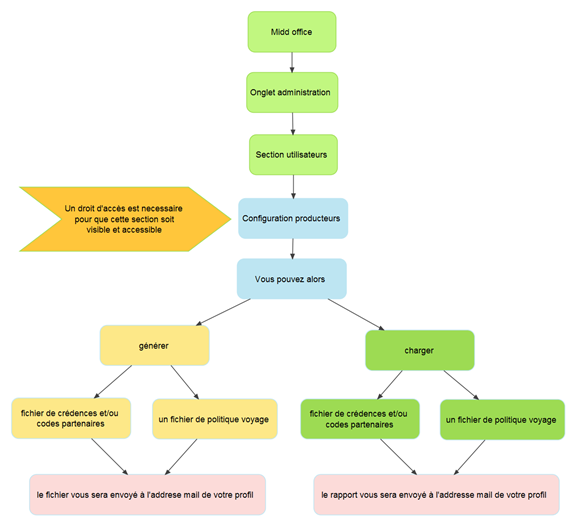
The purpose of this new functionality is to simplify the uploading of every producer’s configuration data by using a pre-completed Excel file, in a format adapted to every producer.
The distributor may choose to send this file to the producer so that the producer completes it using its reservation system access parameters.
Once the file has been completed by the producer, the distributor may upload it from the new interface and confirm that everything is in order via an email listing the actions carried out.
Diagram of the operation of the massive management of “producer configurations”
1/ Downloading a pre-completed fils
The “Downloading user information” section of the interface helps generate a pre-completed file with the users defined in the administration tool. To do this, a form must be completed with the following parameters :
Type of file (credences/partner codes or travel policy),
Producer,
User level: User level for which the distributor wishes to generate the file (generally “channel”, “agency” or “agent”),
Users: A dual select-box selects the list of root users from which the lines of the file will be generated. The file will contain all users hierarchically below the user(s) selected, whose type corresponds with the user level already defined.
“Producer configurations” management form
2/ Receiving the file generated
Once the form has been validated, the file is generated and immediately emailed to the user connected to the administration tool.
The email associated with the connected profile must therefore be correctly configured.
3/ Uploading a file
Once the file has been completed (by the producer for example), it can be uploaded via the “Uploading the credences/partner codes or travel policy” section.
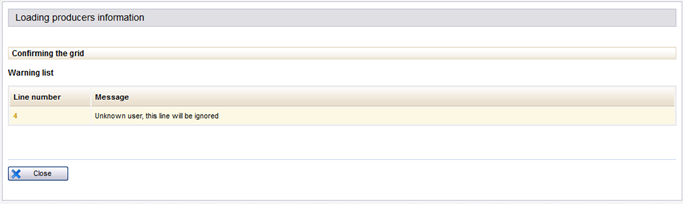
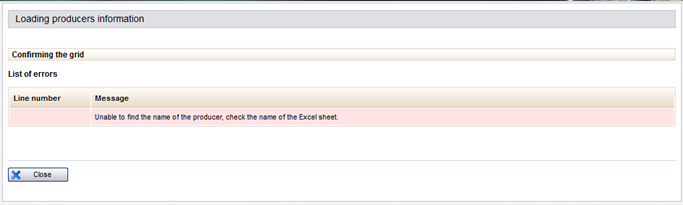
There is a validation stage to detect the validity of the file and potentially view the invalid lines which will be ignored.
Case of non-critical warnings
Case of a critical error
4/ Access rights
Two new rights were added to this new interface.
CONFIGURATION-Users-Producer configuration,
This is the right giving access to the new interface. It is then possible to generate or upload credence, partner code and travel policy files.
This is the right defining the list of “accessible users” in the select-box o
f the producer configuration interface. This right activates a tick box on the user profiles pop-up. Simply tick that box to make the user accessible.
Tick box for adding the user to the list of accessible users in the producer configuration interface
Transverse transfer services
Transfer services are now managed in the “Services” tab of the administration tool. This is why the Excel chart of services has been modified with the addition of a new “SERVICE_TYPE” column.
This column can have 3 different values:
STD: standard service,
TRF_I: transfer in,
TRF_O: transfer out.
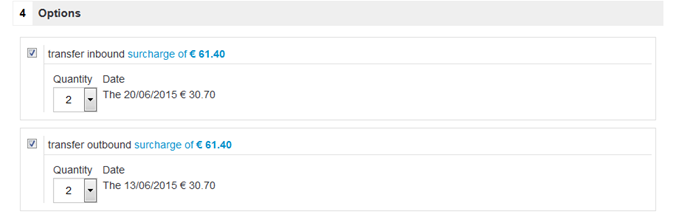
As with standard services, the transfers can be included in a pre-package (in which case they are compulsory) or linked to products via rules defined in the “Services” tab (in which case they are optional).
These transfers will appear in the package sales process if their availability matches the travel arrival and departure dates. For example, a pre-package product (from 01/05/2015 to 08/05/2015) including transfers (in and out) will include an outward service on 01/05/2015 and a return service on 08/05/2015.
Viewing optional transfer services
Choice of sales process in services/hotels connections
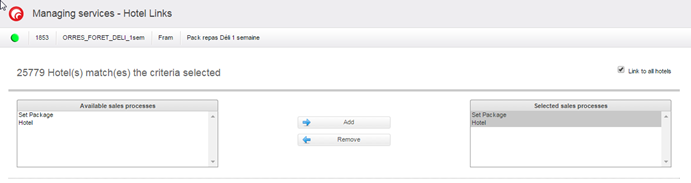
The interface connecting the services with the hotels (“Services” tab) now enables the selection of sales processes in which transverse hotel services must appear.
Services already connected will be automatically available for hotel and dynamic package processes.
Selection of a sales process in the services/hotels connection interface
Improved currency display
Modifications have been made to the interface of the administration tool to display the currencies in a pertinent and consistent manner.
Optimisation of catalogue services
The algorithms of the search engine retrieval services (“searchEngine”) and package search services (“searchProducts”) have been revised to optimise their performance.
REST / JSON Web services
The main web Orchestra services are now available via a REST API, with requests/responses in JSON format.
Supplier email in the “Partners” module
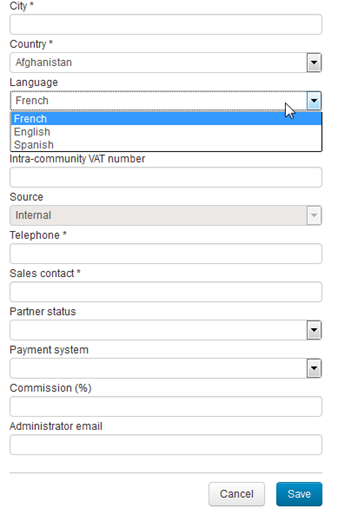
It is now possible to send the account creation email in the supplier’s language, thanks to a select-box in the partner creation interface.
Language selection in the partner creation form
Reinforced controls on the reservation tunnel entry form
New features help manage passenger-related constraints before entering the reservation process.
Minimum and/or maximum number
of passengers,
Minimum age required for the
trip,
Minimum age from which the
constraints relating to the minimum/maximum number of passengers are applicable,
Age calculation according to
the arrival or departure date.
The minimum and/or maximum number of passengers is now applicable to all packages, no longer just to rental products. These constraints correspond with the total number of people accepted by the producer for the trip.
The minimum age required for the trip replaces the babies/children not allowed feature.
The validation of this data can now be integrated into the catalogues to check the validity of the selection made before entering the reservation process. This verification will help improve the user experience as the Internet user or travel agent won’t have to launch an estimate to find out whether the date selected is compatible with the selected passenger constraints.
This validation will be effective by clicking on the “reserve” button. If the date is not compatible with the passengers’ constraints, an information message will appear.
In addition, information on the different constraints can also be permanently displayed on the form. The form of the B2B solution has been modified accordingly so as to display :
The minimum and/or maximum
possible number of passengers in a blue insert above the form,
The age groups corresponding
with adults and children, as well as the minimum age allowed,
An indication to determine
whether the age taken into account is that at the beginning or end of the trip.
Example of implementation in the B2B solution
Franfinance payment
The Franfinance payment solution was integrated via the Sips/Atos PSP. It is now possible to pay in 3 instalments using this solution.
New Franfinance method of payment
Prioritisation of certain types of flight
It is now possible to prioritise certain types of flight on flight sale, dynamic package and pre-package processes, regardless of their price.
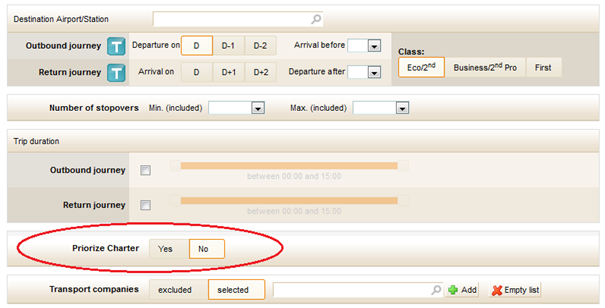
In the pre-package, a criterion can prioritise or not charter flights for compatible flight sources.
Choice of charter flight prioritisation in the pre-package
Multi-language emails
It is now possible to send emails in the customer’s language.
For automatic emails (emails which are not sent by choosing a “template” in the interface), the customer’s language is selected automatically. For emails sent manually, the language is selected via a select-box.
Choice of email language in the file modification section
Improved multi-currency management
Multi-currency management was completed by the addition of currencies in the estimate, payment, estimate adjustment and invoice sections.
The notion of currency was also added to the accounting module, with the possibility of uploading supplier invoices in their own currency.
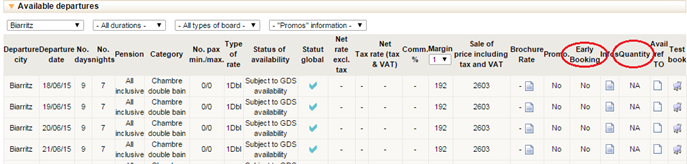
Stock quantity and “advance reservation” status
For compatible producers, it is now possible to record this information in the availability of each product.
The information can be found in the product data sheet of the administration tool and can be used in the catalogues.
New information on the amount of stock and the “advance reservation” status