Default sorts are now contextual to what is being sorted. In this case, averages and number of reviews are sorted from highest to lowest by default (best score/highest number of reviews first), whereas sorting by price will always show results from lowest to highest.
Additionally, averages/number of scores shown in the product blocks are also contextual to the type of review used for the sort :
Sorting by expert reviews will
show averages/numbers of expert reviews in the blocks
Sorting by user reviews will
show averages/numbers of user reviews in the blocks
Specific sections in package descriptions
It is now possible to display a specific package’s editorial zones in the B2B solution’s product descriptions.
The way these specific sections are displayed can be configured and they are shown after the package description’s standard sections.
A specific section of the editorial is displayed in the product description
New technology for managing editorials
The technology that manages the platform’s editorials has been replaced. A next-generation database for managing documents has been put in place and all associated services reviewed to bring maximum stability and better performance.
This technical change doesn’t impact any of the features. They remain the same as in the previous version.
Improved flight display
Displaying flights in the “travel details” section now includes information on layovers, their length, terminals involved, etc.
Details of a trip’s flight layovers are displayed
New module name
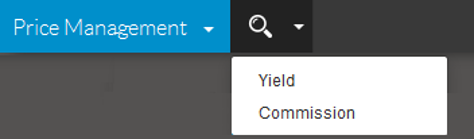
The “Yield” module has been renamed “Price Management”, and you can now create commission rules as well as “yield” rules.
The “Price management” module has two main sections
Commissions by source
You can create commission rules for hotels, flights, and extra services.
These rules are defined by a name, a value, and a set of criteria. All hotels, flights, or services that fit these criteria and whose source does not already provide a commission will use the commission defined in this rule.
List of defined commissions
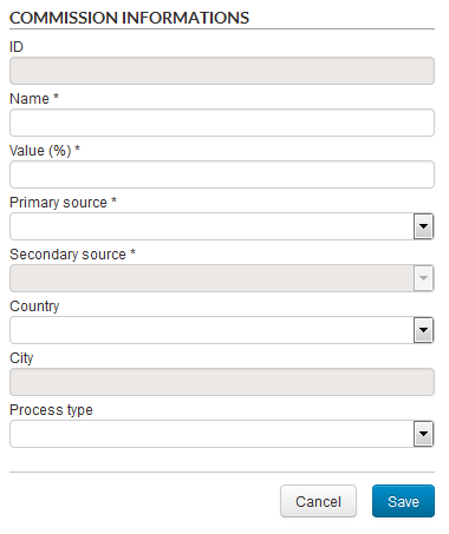
1/ Hotel commissions
The criteria for rules on hotel commissions are as follows :
Source primaire (Obligatoire),
Primary source (required)
Secondary source (required, used for the hotel aggregator)
Country (optional)
City (optional)
Sales process (optional, available values are Package, Hotel and Dynamic package)
Creating a hotel commission rule
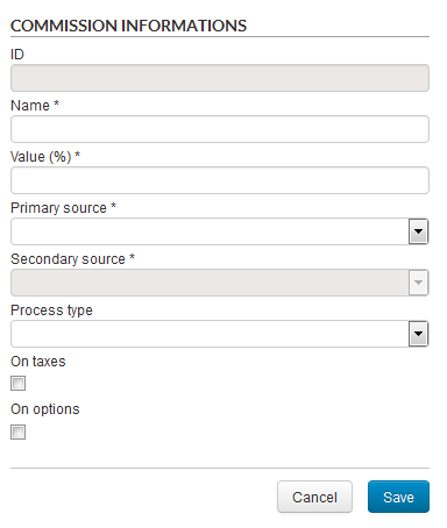
2/ Flight commissions
The criteria for rules on flight commissions are as follows :
Primary source (required)
Secondary source (required, used for domestic flights)
Sales process (optional, available values are Transport,
Package and Dynamic package)
Additionally, you can decide if this commission also applies to taxes and flight options (such as luggage options).
Creating a flight commission rule
3/ Service commissions
The criteria for rules on service commissions are as follows :
Primary source (required, only internal services are currently available)
Secondary source (required)
Sales process (optional, available values are Package, Hotel and Dynamic package)
Creating a service commission rule
New rules for “yield”: External hotels and Flights
You can now create “yield” rules for external hotels as well as flights.
List of yields on external hotels
1/ Yield on external hotels
External hotel yields are applied on the price of the stay and not on the price per night as in internal hotels.
These rules apply only to hotels and only to those that fit in the criteria defined in the “Stay properties” section.
Defining a yiels rule for external hotels
In this example, the rule will only apply to stays of 7 to 15 nights, where the check-in date is a weekday between September 1 and 15, and where the commission is between 10% and 18%. This rule will only be applied to the two hotels selected in the list.
2/ Yield on flights
In the same way as for product and hotel yield rules, you can define yield rules for flights. These rules apply a percentage or fixed yield on the price of a flight.
However, contrary to product and hotel rules, these rules are not directly attached to flights but to a route (departure city – arrival city). You can also decide if this yield applies to taxes or not (in the case where yield is a percentage).
Creating a flight yield rule
Advanced monitoring
A new monitoring system has been created to more rapidly detect potential anomalies in the reservation process. This monitoring system looks at the history of past events to detect any abnormal deterioration in the following areas :
Conversion rate
Response time
Error/success rate
Absence of a particular action
(no reservation, for example)
For example, we can set an alert that triggers if the number of reservations made on Monday mornings between 8am and 12pm and on a specific payment platform is 50% lower than the usual number of reservations made on a Monday morning.
The various possible alerts must be configured. Furthermore, a minimum history is necessary for alerts based on past events to function correctly. At first, alerts will only be triggered if we notice a certain number of similar, consecutive errors. Alert rules will be adapted over time.
Alerts can be created using the following elements :
Product type
(package/pre-package, hotel, transport, dynamic package)
Sales process
Sales channel
Medium (desktop, tablet,
mobile)
Browser (type and version)
Payment system
Payment method
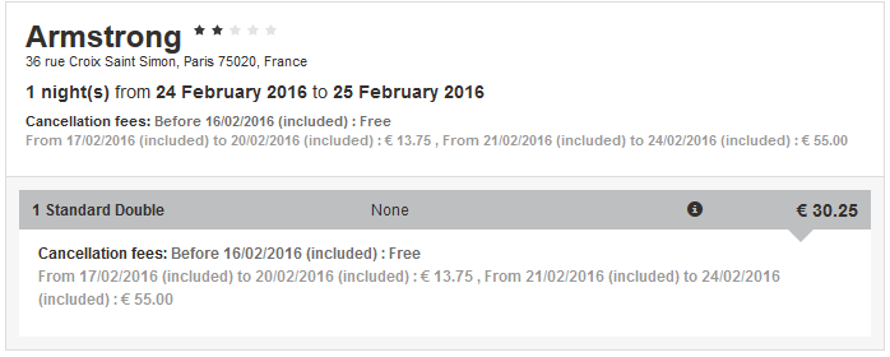
Managing cancellation conditions for external hotels
Cancellation conditions for external hotels are now managed in the hotel and dynamic package reservation processes.
A sentence indicating cancellation conditions and fees is displayed on the search results page, under each room.
How the cancellation for a room are displayed on a search result page
The conditions are also shown on the estimation page in a similar way.
How the cancellation conditions for a room are displayed on the estimation page
New source for airlines : Amadeus
The Amadeus airline source is now available on the Orchestra platform. It is compatible with all sales processes. Accessing this source requires GDS access with Amadeus (Office ID).
This source supplies all companies available on the GDS as well as Low Cost Companies (LCC) :
Either available directly via
Amadeus in “lightticketing” mode, such as: EasyJet, Ryanair, Transavia (LCC
payment required at the time of reservation),
Or directly available like a
classic company (such as Vueling, JetAirFly, Aer Lingus, etc.)
Or available via an LCC
aggregator when the LCC is not available at all in Amadeus
Furthermore, departures from cities outside the capital can also receive transport offers of train + flight (”Air TGV”) through this new source.
Managing additional luggage is also offered for EasyJet, Ryanair, Transavia and Air France. Other airlines can also offer this in the future.
Payments to LCCs can be made via the virtual bank card generation module added previously.
1/ Rate types
Amadeus offers several rate types :
Public rates
Negofares rates (the R, U rates) which have three types :
Standard R, U rates (such as PTC ADT, CHD, INF, etc.)
“Corporate” rates (available with a “corporate” code) – Standard R,U rates with corporate code
TO rates (only available for flights associated with a land-based service) – Inclusive tour R,U rates (PTC IIT, INN, ITF): Rates valid only if the tour operator sells the flight with a land-based service (hotel, circuit, cruise, etc.)
Amadeus also manages other types of PTC (Passenger Type Code) rates such as senior, youth, Spanish residents, etc. that have conditions attached.
The rate content offered by these LCCs, either via Amadeus or the aggregator, changes regularly depending on negotiations between Amadeus and the LCC.
2/ Luggage management
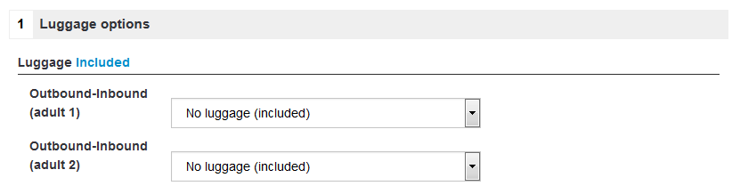
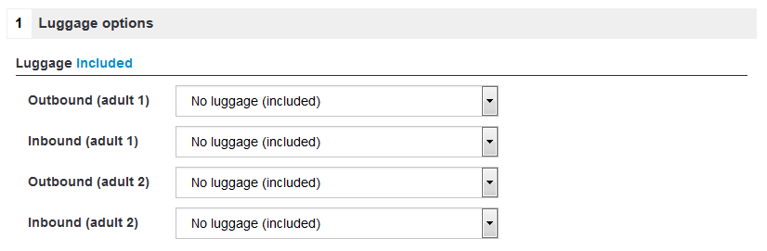
There are two types of luggage :
Round trip. Luggage choice is for both the outward and the return journeys.
It will be displayed in the reservation process as follows :
Round trip luggage selection
Outgoing trip, and return trip. Luggage selection is made separately for the outgoing and return trips.
It will be displayed in the reservation process as follows :
Outgoing and return trip luggage selection
3/ Use in pre-packages
As for other sources, creating pre-packages requires requesting prices and availability from the source. In order to preserve “look to book” rates, we use a cache.
Amadeus Smart Cache Packaging sends the lowest available price (=1 flight) for a given Origin/Destination (O/D) couple for each departure date and length defined.
This cache can be of two types :
Public cache: for example, contains the Top 1,000 O/Ds of the French market – public prices only – with criteria determined by Amadeus
Private caches which can be supplied by tour operator and include flight characteristic constraints
4/ Business model
Access to this source depends on a business model that includes a “look to book” ratio that must be respected.
New source for airlines : MisterFly
The MisterFly airline source is now available on the Orchestra platform. It is compatible with all sales processes. Including this source offers access to all flight content available from MisterFly. Accessing this source requires an agreement with MisterFly.
1/ Luggage management
Luggage selection is made separately for the outgoing and return trips. It will be displayed in the reservation process as follows :
Outgoing and return trip luggage selection
2/ Use in pre-packages
The prices and availabilities needed in configured pre-packages are available via requests to a cache system with specific credentials.
Optimising Vacances Transat production
New types of offers are now available for the producer Vacances Transat.
These more flexible offers let clients choose certain elements of their trip by dynamically suggesting alternative flights or options, for example.