Strengthening password security

Why ? To improve security when accessing tools, and in respect of GDPR guidelines, it is necessary to strengthen password management on the platform.

Where ? On the administration tool, and the pro tools (B2B solution, back-office, tariff management).

How ? The way in which user passwords are managed has been reviewed in the administration tool. Here are the key changes :

  • Passwords are no longer visible in user profiles, including administrator profiles.
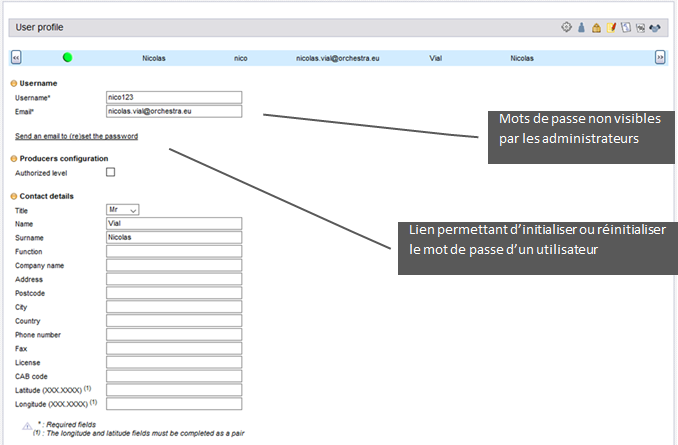
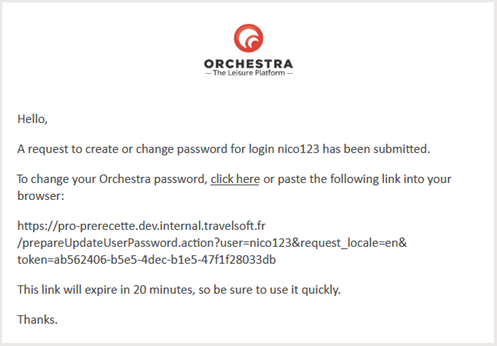
  • The forgotten password recovery process has been strengthened. An email containing a secure link will now be sent to the user’s email address, where they can then set up a new password. The link can only be used once and for a limited time. This email can be triggered by the users themselves on the login page (‘forgotten password’) or by an administrator on the administration tool (‘send an email to (re)set the password’).
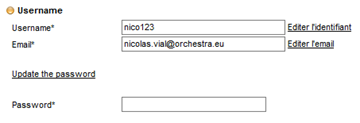
  • Changing user login details, email addresses and passwords on the administration tool cannot be carried out without knowing the password.
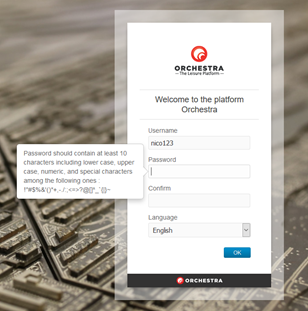
  • The ‘strength’ of new passwords will now be controlled. They should contain at least 10 characters, including upper case letters, lower case letters, numbers and special characters.
Furthermore, passwords for FTP accounts as set when exporting from the ‘configuration’ section have been hidden.
Managing SFTP protocol for file transfers

Why ? To improve the security of file transfers, and in respect of GDPR guidelines, it is necessary to use secure data transfer protocols, particularly when handling sensitive data.

Where ? In the module that manages importing content and provider availability, as well as export features within the administration tool.

How ? Regarding the import module, providers connected to Orchestra can now send their data to an SFTP account, hosted by Orchestra or by themselves.

Regarding the administration tool, various exports can now be configured to deposit the exported files to an SFTP account. In addition to the URL, username and password, a specific port can also be configured.

Customisable destination criteria
for the hotels sales process

Why ? To provide users with a destination search field that can be customised by the administrator.

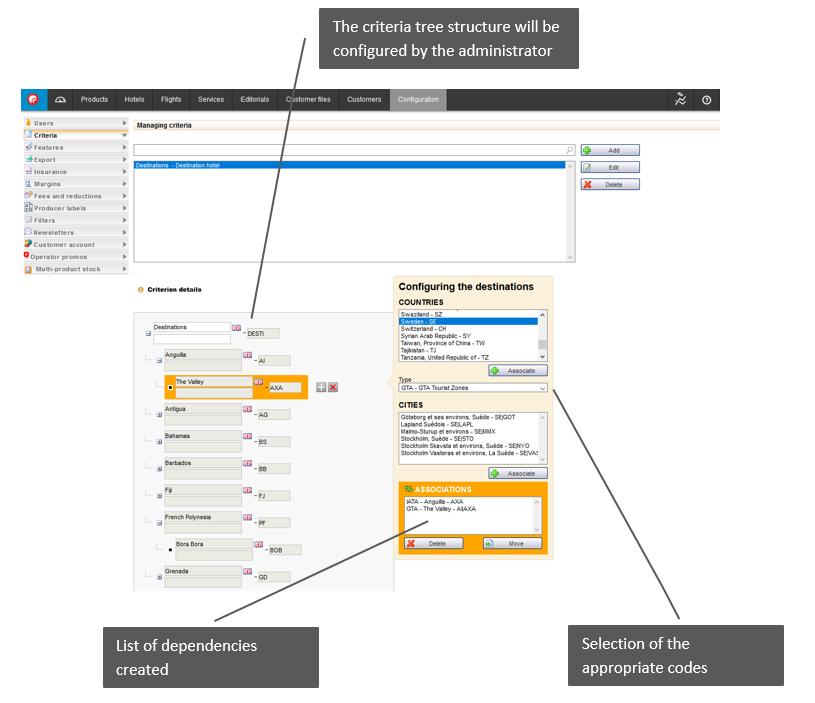
Where ? These criteria can be configured in the administration tool, ‘configuration’ tab, ‘criteria’ section. The search field will then be used within the catalogue on the hotels sales process search form.

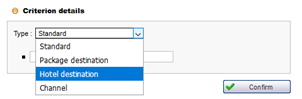
How ? Similar to the destination criteria used by package search engines, destination criteria for hotel searches can be configured. A new criteria type, ‘hotel destination’, has been added. The old destination criteria focussing on packages has been renamed as ‘package destination’. 

Because the hotel search function operates in real-time, this destination criteria includes a few differences compared to the package destination criteria. Each criteria value must be linked with a geographic area, which is dependent on the hotel source.

New hotel sources: Sunhotels and JacTravel

Sunhotels and JacTravel hotel sources are now available on the platform. They provide services in resorts and cities in more than 120 countries around the world.

Pre-selection of passengers from customer accounts

Why ? To make it easier for users to complete the ‘passengers’ section on the contact details page

Where ? On the contact details page within the booking process.

How ? When using customer accounts within the catalogue, it is now possible to carry over the customer information and linked passenger list to the booking process. This makes it possible to include select boxes on the contact details page with a list of possible passengers. All users need to do is select the required passengers to automatically complete the ‘passengers’ section. The ‘customer’ section can also be pre-filled and made read-only, if necessary.

Pre-selection of airlines in flight searches

Why ? To highlight flight offers and dynamic packages with airline pre-selections.

Where ? Within search results for the flight and dynamic packages booking process.

How ? The catalogue can now generate a list of airlines within the flight and dynamic packages booking process. Airlines will be preselected, but users retain the option to remove these filters if they wish.

This feature is also available within the B2B solution. The search form will display a pre-filled list of airlines in the corresponding search field.

Platform improvement

Uniform HTTPS protocol management across the entire platform.

Improvement of administration tool :
export packages and user rights

  • When exporting packages, it is now possible to export packages that have been highlighted because of a specific code, whether active or not.
  • New user permissions have been added to prohibit the deletion of criteria in the ‘configuration > criteria’ section (values within the criteria can still be deleted).

Improvement of internal production :
customer information and educational messages

  • There is now an option to no longer send customer information (phone number, email address, home address) to the ‘channel manager’.
  • When entering pre-packages in the administration tool, tips will now appear in the form of short messages, rather than error messages.

B2B solution improvement:
hotel slideshow, product sheet and map tab

  • There are now extended slide shows available from Easyvoyage hotels in order to benefit from the quality of the content.
  • There is now an option to add headers and footers to printable versions of B2B solution product sheets. For example, it is now possible to display agency contact details and logos in the header and legal information in the footer.
  • A ‘map’ tab has been added showing the geolocation of a hotel on Google Maps (if the geolocation is known).

Improving hotel connectivity:
Synxis, GAT and Travelcube

  • Technical modifications have been made in terms of connectivity with the Synxis hotels source in order to improve information sharing from agencies making the bookings.
  • Technical adaptations have been made in terms of connectivity with the GTA and Travelcube hotel sources in order to account for new versions of their systems.

Flight Connectivity Improvements: Amadeus and Misterfly

For the Amadeus source :

  • For the Amadeus flight source, technical improvements have been made in terms of connectivity, meaning quote pages showing flights will now appear more quickly.
  • For the Amadeus flight source, there is now an option to find special rates negotiated as part of selling dynamic packages or pre-packages.

For the Misterfly source :

  • For the Misterfly flight source, ‘on demand’ availability statuses can now be managed. This status, visible in confirmation emails and the back-office, allows you to manage situations where flight reservations fail but you still want to keep the booking to manually manage the flights that haven’t yet been booked.
  • For the Misterfly flight source, there is now an option to have a cache system per channel, in order to improve the relevance of any pre-calculations necessary for pre-packages.

Connectivity improvements

  • Improved connectivity with the Jettours provider to check the most relevant catalogue whenever a date is available in more than one catalogue.
  • A new catalogue for the JettoursTCI brand has been added containing transport offers (regular and low-cost), based on existing weekend type trips.
  • In the availability import report, visible in the ‘statistics’ tab on the administration tool, a new message will explicitly alert users whenever a product is no longer available.
  • There is now an option to send a discount code from the catalogue for providers working with the Gestour system (Visiteurope, Beachcomber, Corsicatours, Solea).

Several payment improvements

  • Technical improvements have been made to the Casino payments system to be able to configure different types of security keys.
  • For the Ogone payment system, a new method has been added allowing additional settings to be sent, meaning specific features of sales to works councils can be managed.

For the BeBill payment system :

  • The iDeal payment method has been added, which is very popular in the Netherlands, in particular.
  • The Bancontact payment method has been added, which is very popular in Belgium, in particular.
  • The FacilyPay by Oney payment method has been added. This method allows payments to be taken 3 or 4 times.

Several improvements for the back office

  • Improvements have been made to how tariff lines are displayed in the back-office when a provider only sends a global commission.
  • A new search criteria has been added allowing users to search folders by ‘internal payment code’.
  • There is now an option to add a label to all folders containing customer comments entered during the booking process. This means users can find them more easily.
  • New automatic exports of supplier invoices (in CSV format) have been introduced, meaning invoices can be exported monthly for the previous month, for example.
  • There is now an option to block the following features for quote-type folders:  travel documents, payments, customer invoices, supplier invoices.