Enabled by default

Migration from Ogone to Worldline

To address the obsolescence of the Ogone payment solution, a new connector for Worldline has been developed. This ensures the continuity of payment services and enables the addition of new features like Apple Pay and Google Pay.

BtoB: user interface improvement

The search results have a new look! The product cards have been redesigned to offer you a cleaner interface, better readability of key information, and smoother navigation. You can also highlight certain products by associating them with different badges through criteria settings.

Platform: Loader before redirection to modules

To improve the user experience, a loading screen has been added when opening a module from homepage. This provides clear and informative visual feedback that was previously missing.

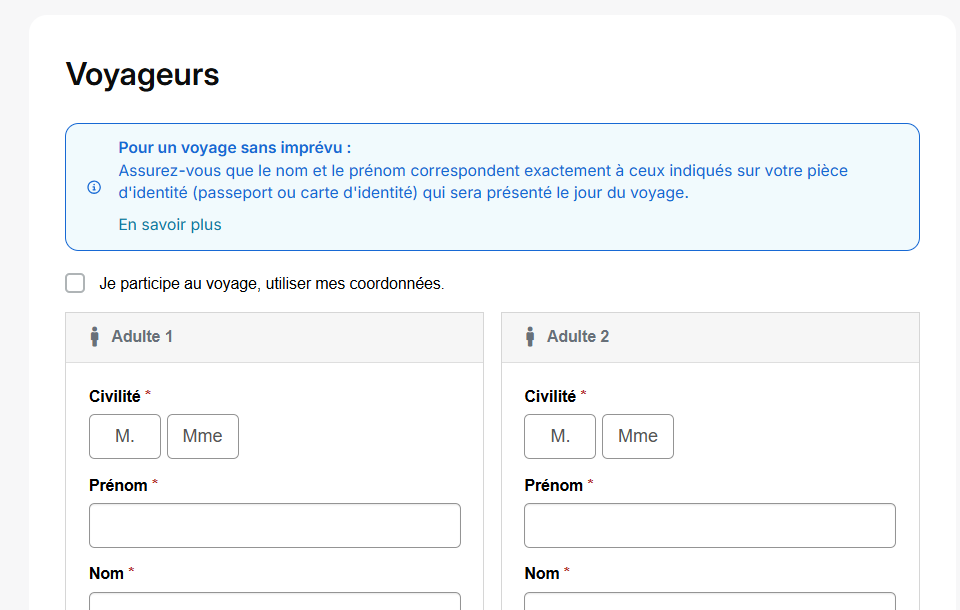
Reservation process: Moving the “I am participating in the trip” checkbox and creating an informational banner

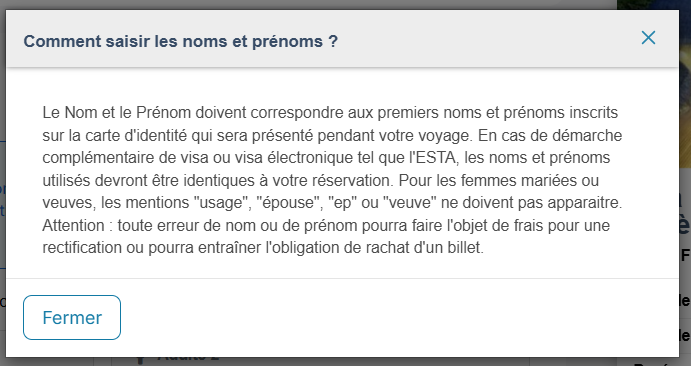
In the booking process, the “I am participating in the trip” checkbox has been moved to the traveler section. By default, it will be unchecked to prevent errors in travelers’ first and last names. Also, to ensure that this information is entered correctly, an informational banner has been added at the beginning of the section to draw the end customer’s attention. This banner also opens a pop-in window to provide further details about this message. By default, this text will be the same for all distributors, but it can be modified upon request during the version update.

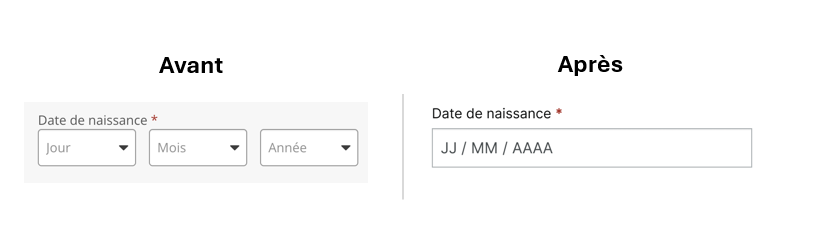
Booking Process: UX Redesign of the Date of Birth Field

The date of birth field has been redesigned to improve data entry and the user experience, changing from a three-part field with a drop-down list to a single field.

BNPL : DCC2 Compliance for Floa and Alma

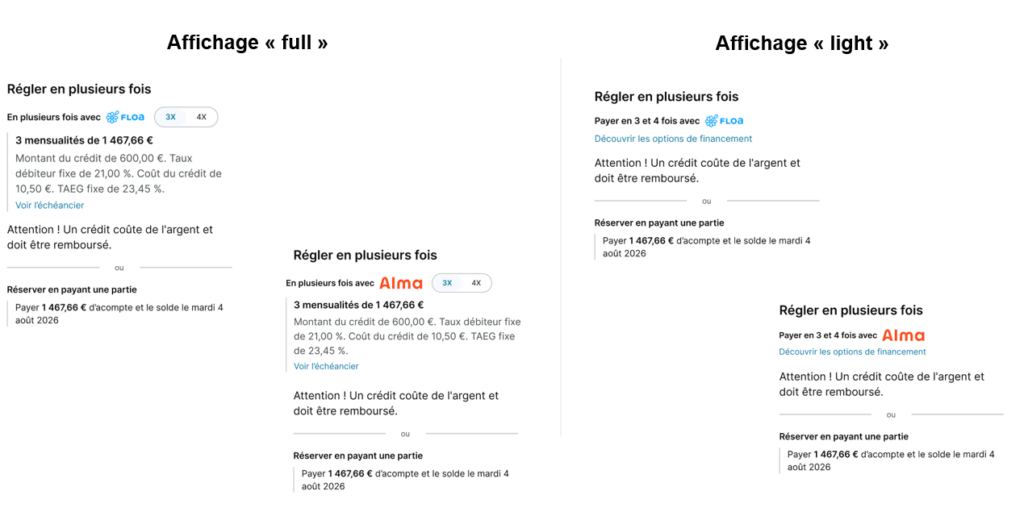
To comply with the new DCC2 regulations governing installment payments, which will take effect on November 20, 2026, changes have been made to the reservation process in the “Payment Options” section and the payment section. Specifically, new mandatory disclosures have been added: fixed APR, borrowing rate, and an explanatory note. The “Payment Options” section has been renamed “Pay in Installments,” again to comply with this new directive. This section will now allow retailers to display:

  • A “full” version: displaying the monthly payment and all the new details (fixed APR, etc.). It is enabled by default.
  • A “light” version: This version will not display the monthly payment amount but will only show the text “Pay in installments” along with an explanatory note.

Air France: API update for electronic invoice generation

The Air France API has been updated to allow for sending the paying agency’s information, in order to comply with the electronic invoicing obligation for B2B transactions in France and to enable Air France to generate the corresponding invoices.

Back office : Modification des vols multi destinations

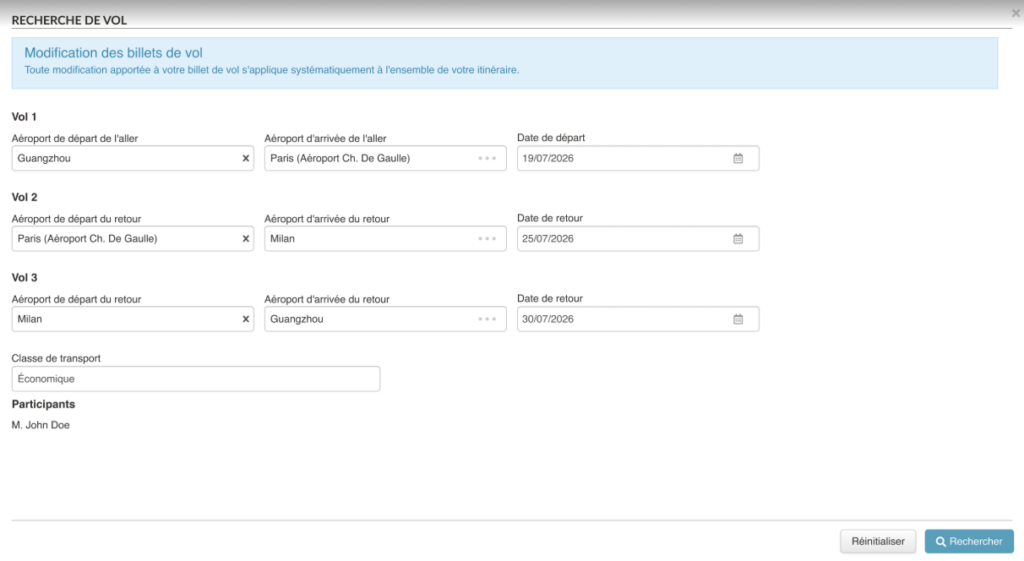
The back office now allows for modifying multi-destination flights. Depending on the ticket source, the user has either a flight-by-flight modification option or a global modification option with an explicit banner warning that any change applies to the entire itinerary.

Booking Process: Display of Options and Creation of Zonings

The booking process has been redesigned to improve user experience and conversion:

Smart Display of Options

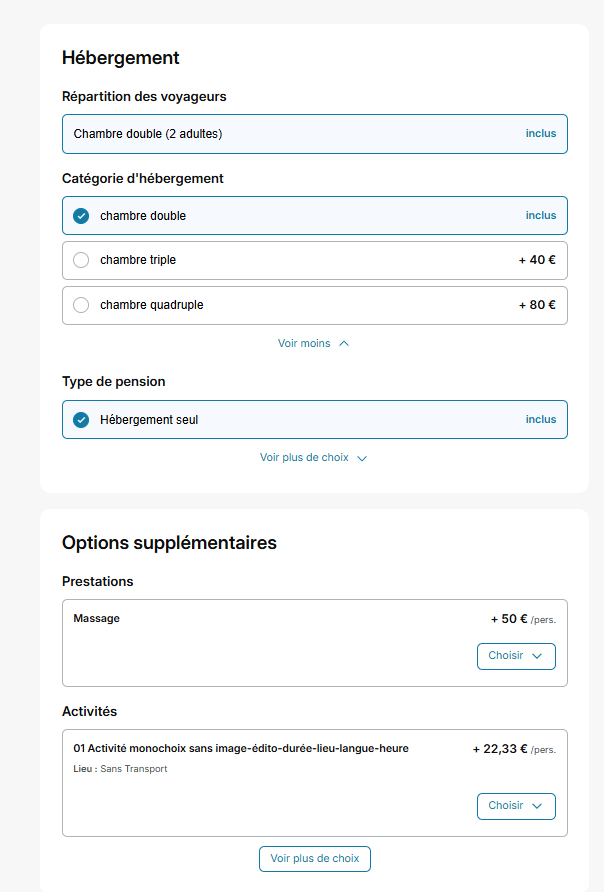
Faced with a large number of options on the quote page (accommodation block, transport, or additional services), we now display only certain options by default. The others are hidden via a button “see more choices” always allowing the user to explore all possibilities but lightening the display. Distributors will be able to configure the number of options to display for each category, but also by producer or by product type.

The default values will be:

  • Accommodation block: Traveler distribution = 1 / Accommodation category = 3 / Board type = 2
  • Additional options block: 5 options displayed.

The transport carousel will be removed in favor of a clearer vertical list. By default, only one flight will be displayed but distributors will be able to configure this number.

Creation of Zonings

Distinct zones have been graphically implemented to better organize and delineate each section of the booking process. The numbers in the bubbles will be removed, and the booking process will switch to a gray background (color configurable for any color other than white). This approach accelerates the filling of fields while lightening the perception of the booking process.

Transport Back-Office / Add TTL value in search

The Transport Back-Office search now includes a filter by TTL (Ticketing Time Limit) date range, allowing operators to proactively identify bookings with approaching or past deadlines to reduce the risk of unissued tickets.

APG Direct Connect / Monitor look-to-book ratio

To control costs and avoid financial penalties for exceeding airline contractual quotas, a Look-to-Book ratio monitoring tool has been developed to track searches in real-time, send alerts, and automatically block non-compliant agencies.

Volotea Integration / Booking

The new transport connectivity with Volotea enriches the platform’s catalog through the direct integration of the low-cost airline via its Navitaire (non-NDC) connector.

Transport / Rebooking feature for ancillary services from the initial booking during a flight change

When changing a flight in the Back-Office, it is now possible to retain the ancillary services from the initial booking through a new interface that allows the agent to re-select them. This enhancement prevents the loss of already-paid services, simplifies case management for agents, and meets a requirement from partner airlines such as Air France and SAS.

Transport / Booking & API / Multi-city management

Multi-city flight search and booking has been implemented, allowing users to book several successive trips with different dates within a single journey (e.g., Paris–Istanbul, then Istanbul–Accra). The solution covers flight-only and NDC APIs, including the management of associated ancillary services..

TravelExchange : commission différente par DMC

Les DMC connectés via TravelExchange peuvent maintenant être gérés individuellement, notamment en terme de commission.

Visiteurs Tour Operator Connectivity: Retrieval of traveler/agency information in their ERP system

It is now possible to transmit to airlines, via the ERP system, the contact details of the agency or traveler (phone and email, including the emergency contact entered by the customer), in order to secure air bookings and avoid ADMs (Agency Debit Memos)

Beachcomber Tours : Emergency Contact

Integration of sending emergency contact information (email and phone with country code) to the Beachcomber Tours system, in accordance with IATA Resolution 830D

Transportation: Trigger ticket issuance after payment via the back office

Pour optimiser la gestion des réservations de transport, il est désormais d’envoyer un lien de paiement direct à vos passagers depuis le back-office. Dès que le paiement est effectué via ce lien sécurisé, l’émission de leurs billets est automatiquement déclenchée. Cela simplifie le processus de vente et assure une émission rapide des titres de transport.

New Travelport Post-Sales Features

The after-sales functionalities of the Travelport connector have been enhanced to allow for passenger modification, the addition of ancillary services, and NDC disruption management, in order to offer agents more autonomy and efficiency in managing their bookings.

Booking Process: Seatmap module enhancement with improved management of seat selections included in the fare

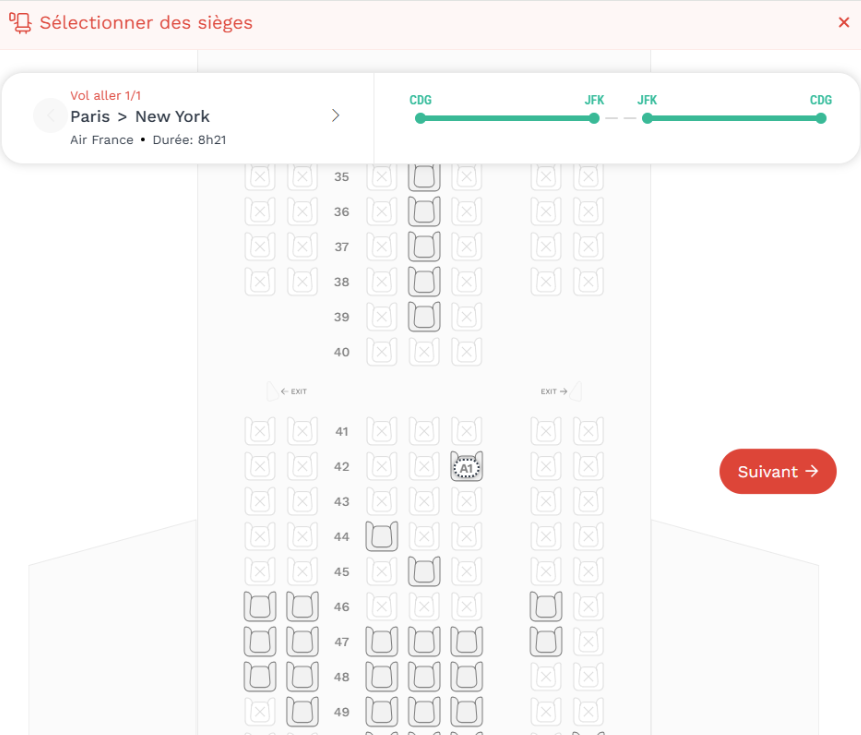
In order to ensure a smoother booking experience and prevent errors, we have improved the management of seat selections included in the fare. From now on, seats pre-selected by the connectivity will no longer be able to be deleted, but will remain modifiable. This evolution ensures the integrity of your fares and minimizes unexpected cancellations.

Order Change Notifications (OCN): Accept, Change, or Refund

This project aims to improve Orchestra’s ability to automatically and seamlessly manage flight changes imposed by airlines, thereby providing greater flexibility and efficiency in processing travel requests.

New “Activities” section in the editorial section for better customer management

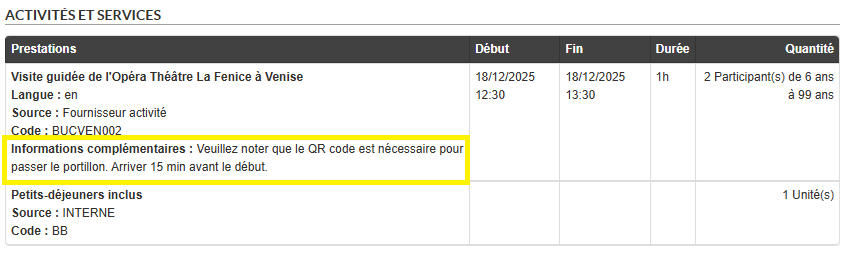
The “Additional Information” section is now available in an activity’s editorial content as well as in the new price grid. It allows for adding essential booking information (e.g., meeting point, on-site contact). These details are then displayed in the confirmation email and the back-office to reduce customer service inquiries.

Accommodations and Package Options for Disneyland Paris

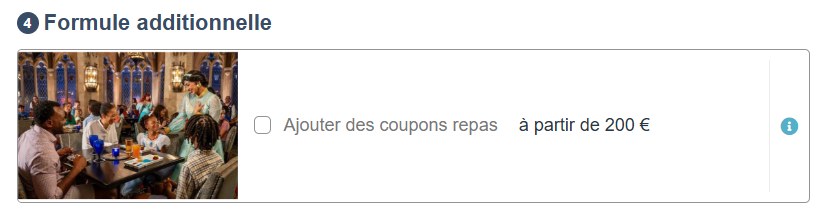
The Disneyland Paris meal coupon packages (1 coupon/day, 2 coupons/day) are now included in a new “Additional Options” section displayed directly on the Quote page, right after selecting the meal plan type. Travelers can optionally and exclusively select one of the available packages.

This section is automatically enabled for stays beginning in April 2027—earlier reservations remain completely unchanged.

Booking process: UX redesign of the payment block

Here is the English translation of the provided text, without emojis or bold text:

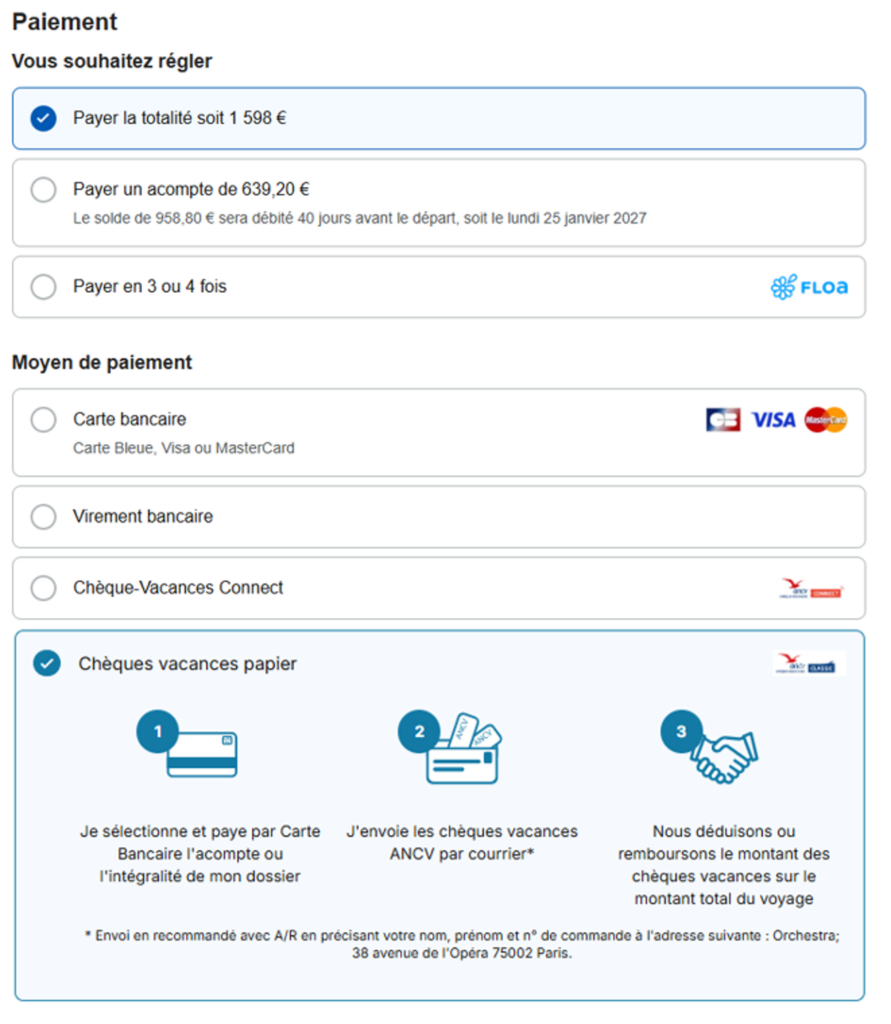
The payment block within the booking process has undergone a complete UX redesign aimed at significantly enhancing the user experience.

This evolution reorganizes the selection of payment methods, including full payment, deposit, and payment in installments. It also streamlines the choice of payment options by first asking the user to select the amount they wish to pay before choosing their payment method. This means that payment methods will no longer be pre-checked, thereby adhering to good UX practices by not influencing the user’s financial choice.

Additionally, paper holiday vouchers can now be displayed as a “dummy” payment method to increase their visibility and better integrate them into the interface.

The main objective of these changes is to improve the conversion rate and streamline the overall booking experience.

Booking process / Pricing & block evolutions

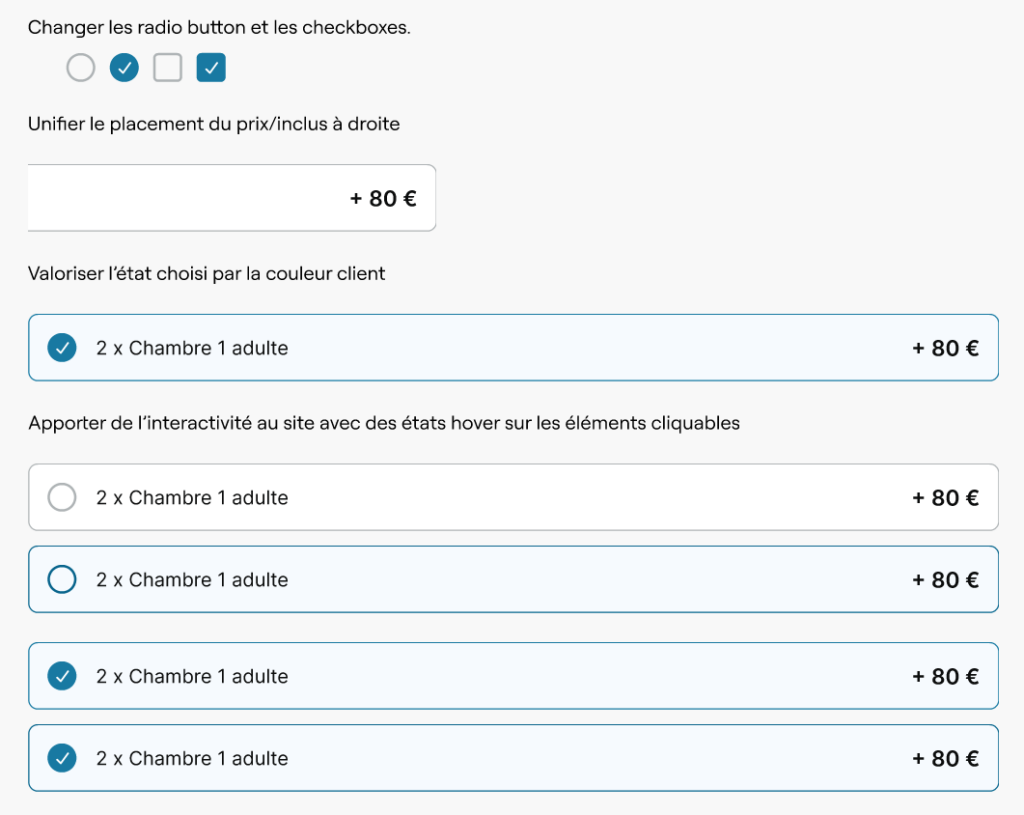
In the booking process, we have implemented a visual update across all selection elements (room, flight, options, insurance, payment, etc.):

  • The radio button is now larger and more visible once selected.
  • The price display makes it easier to compare options.
  • Selected items are highlighted using your brand’s color scheme.
  • The behavior for customizable options has been modified.

The objective is to harmonize these different elements to offer a smoother user experience and thereby contribute to improving conversion rates.

Booking process / CTA homogenization

We have updated the booking process interface to standardize its call-to-action buttons. The goal was to replace the old, inconsistent buttons with our new visual standards to provide you with a more coherent navigation experience. Now, each step of the journey features a simplified and uniform interface, improving readability and usability.

Adding an OSI to Amadeus PNRs

An airline-specific reliability code is now sent as an Operational Service Information (OSI) in Amadeus PNRs, thereby ensuring the compliance and reliability of flight-only bookings or pre-packaged products.

Hotel Details

As part of the redesign of the mid-office workflow, the interface for the “Hotel Details” page has been updated.

The goal is to bring this page in line with the new design standards by reusing the same components as the “Product Details” page, in order to ensure a consistent and cohesive experience throughout the tool.

Updates to Pagination in Selection Modals (Transportation, Cars, Services)

In the booking process, we have updated how our results lists are displayed in the selection modals. The traditional pagination has now been replaced by a “See More” button.

This change allows for a smoother, continuous browsing experience of the available options (flights/trains, vehicles, and additional services) without losing sight of the items displayed first.

Back office: Display of known cancellation conditions per service. 💻

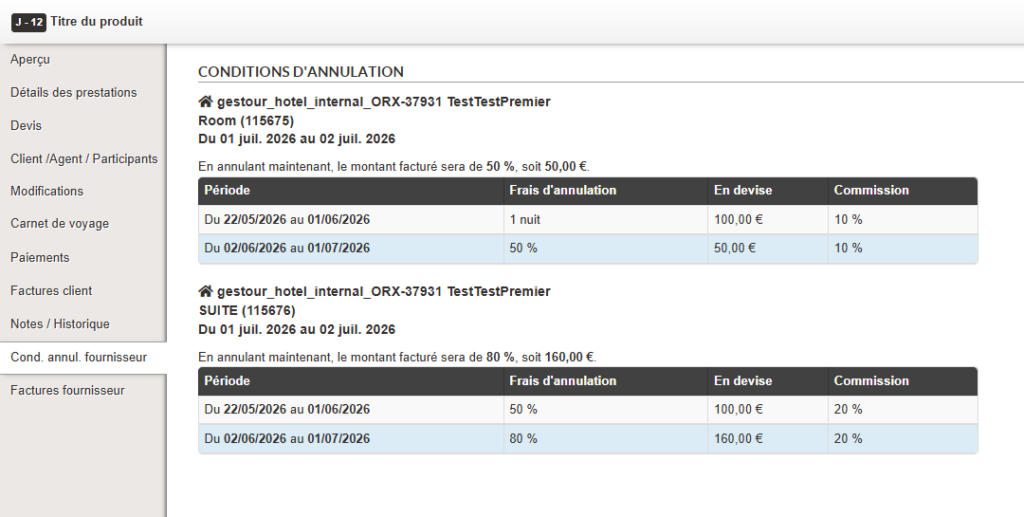
In the back office, a new tab, “Supplier Cancellation Conditions” (“Cond. annul. fournisseur”), has been added to the left-hand menu of a file. This tab will now allow the visualization of cancellation conditions (in % and in currency). Initially, only those for internal hotels will be displayed, but in the future, it will also be possible to view those for activities/car rentals if connectivity allows.

The direct benefit is an improvement in agent productivity thanks to pre-filled and accurate information during cancellations.